Capstone - Ernest & Alexander
For my Game Design Capstone, I partnered with Lily Ahmad-Davis to develop a 2.5D narrative-based video game. Ernest & Alexander is a story about friendship, belonging, and empathy, told through exploration, dialogue, and a series of narrative-linked minigames that bring Ernest's world and experiences to life.
Research Question:
How can I create a game that integrates minigames to enforce and support narrative to design an experience that subverts visual novel expectations?
Date:
March 2025 - October 2025
Game Files & Video Playthrough
Click here . To play, download and extract zip folder, open Ernest & Alexander.exe to play


Ernest & Alexander trailer - footage recorded by Millie, edited by Lily
Documentation and Annotations
Pre-Semester
Lily had the original idea for our game, it was a concept she had been thinking about for a while, and presented it as an idea for our capstone project. I immediately loved it and we started brainstorming. This is Lily’s initial concept ->
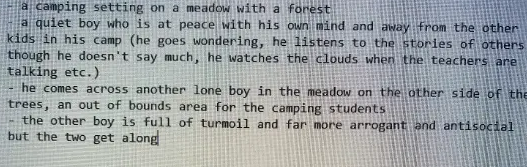
Screenshot of the idea Lily sent me (fig. 1)
We decided that while we wanted our project to be heavily narrative and character based, we did not want to create a visual novel. To ensure that it stayed an interactive game, we decided to add minigames throughout the story that tie in with the narrative.
Game Inspirations
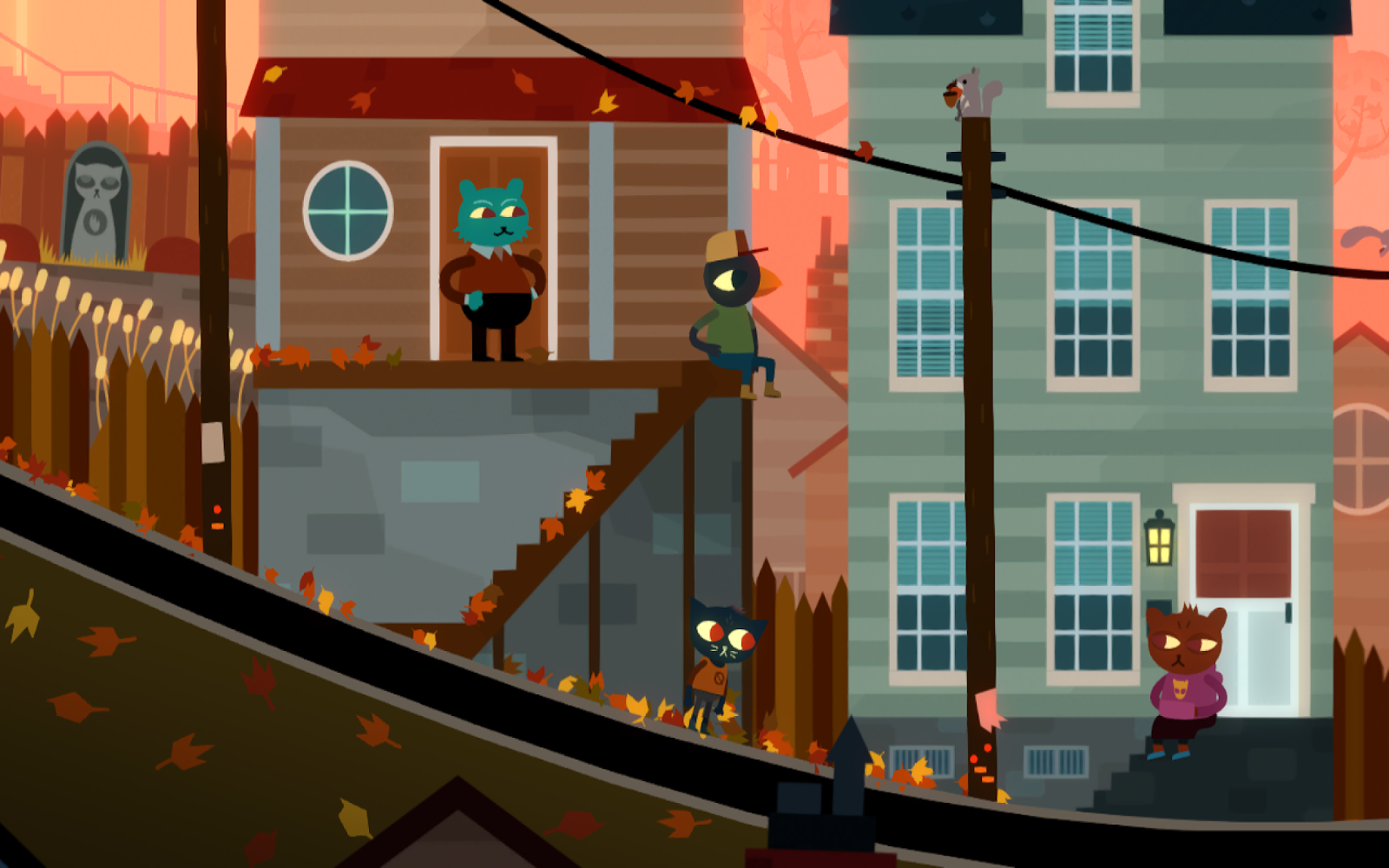
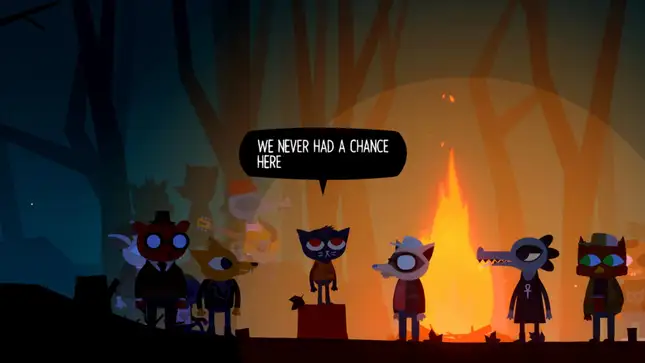
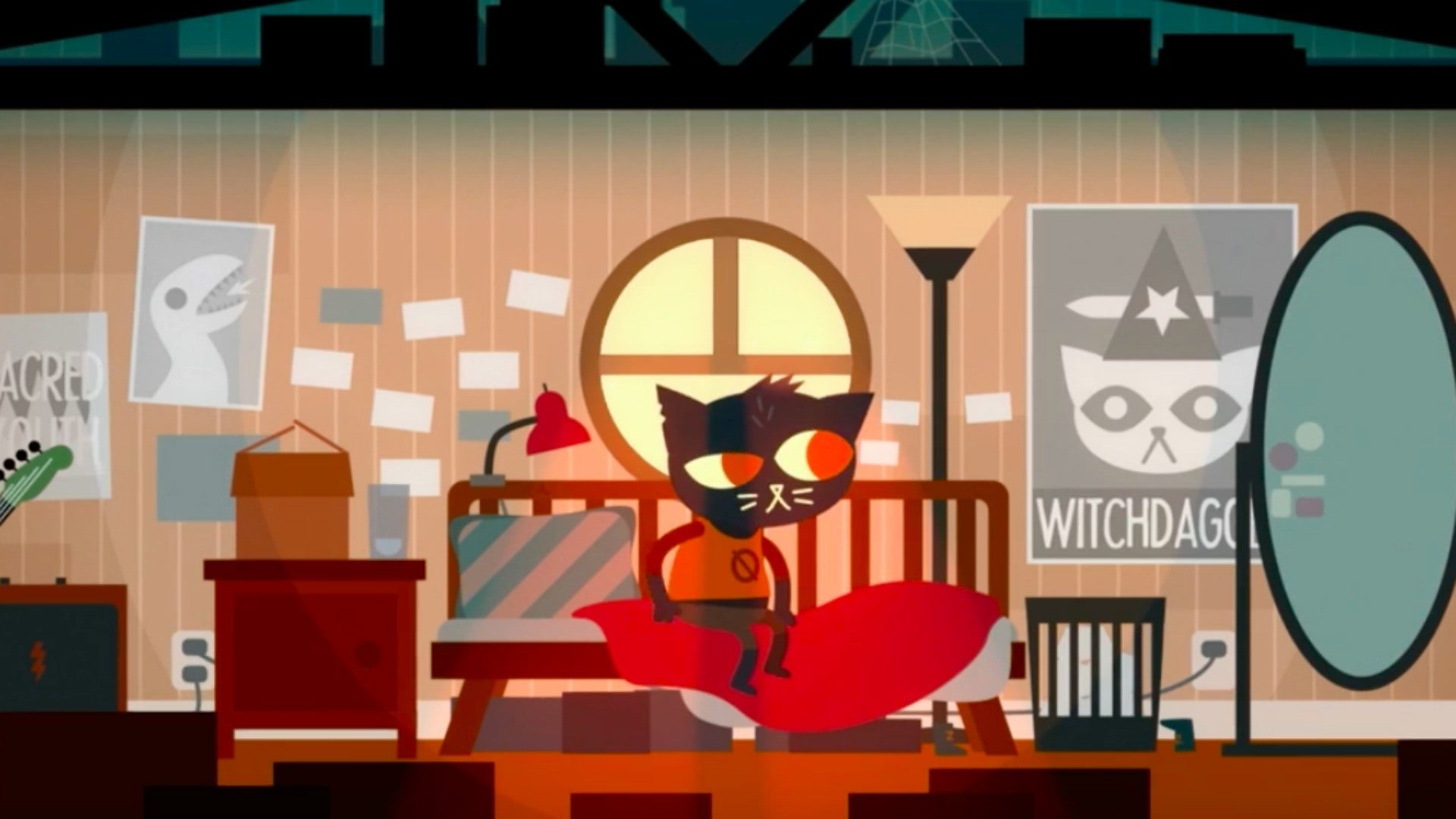
Screenshots from Night in the Woods (fig. 2, 3, 4)
Night in the Woods: Both the visuals and mechanics are heavily inspiring us. This is a very narrative driven game, however there are many objects and characters for the player to interact with. The dialogue system is also amazing in this game, so I will be researching more about it.
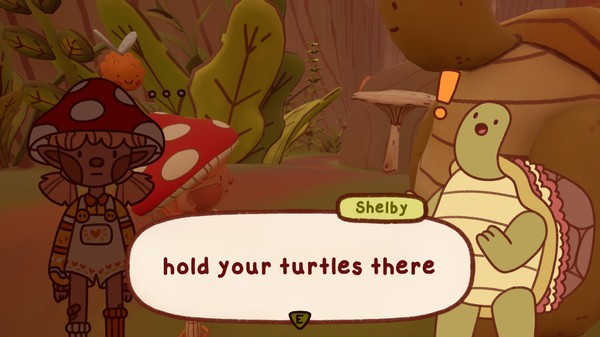
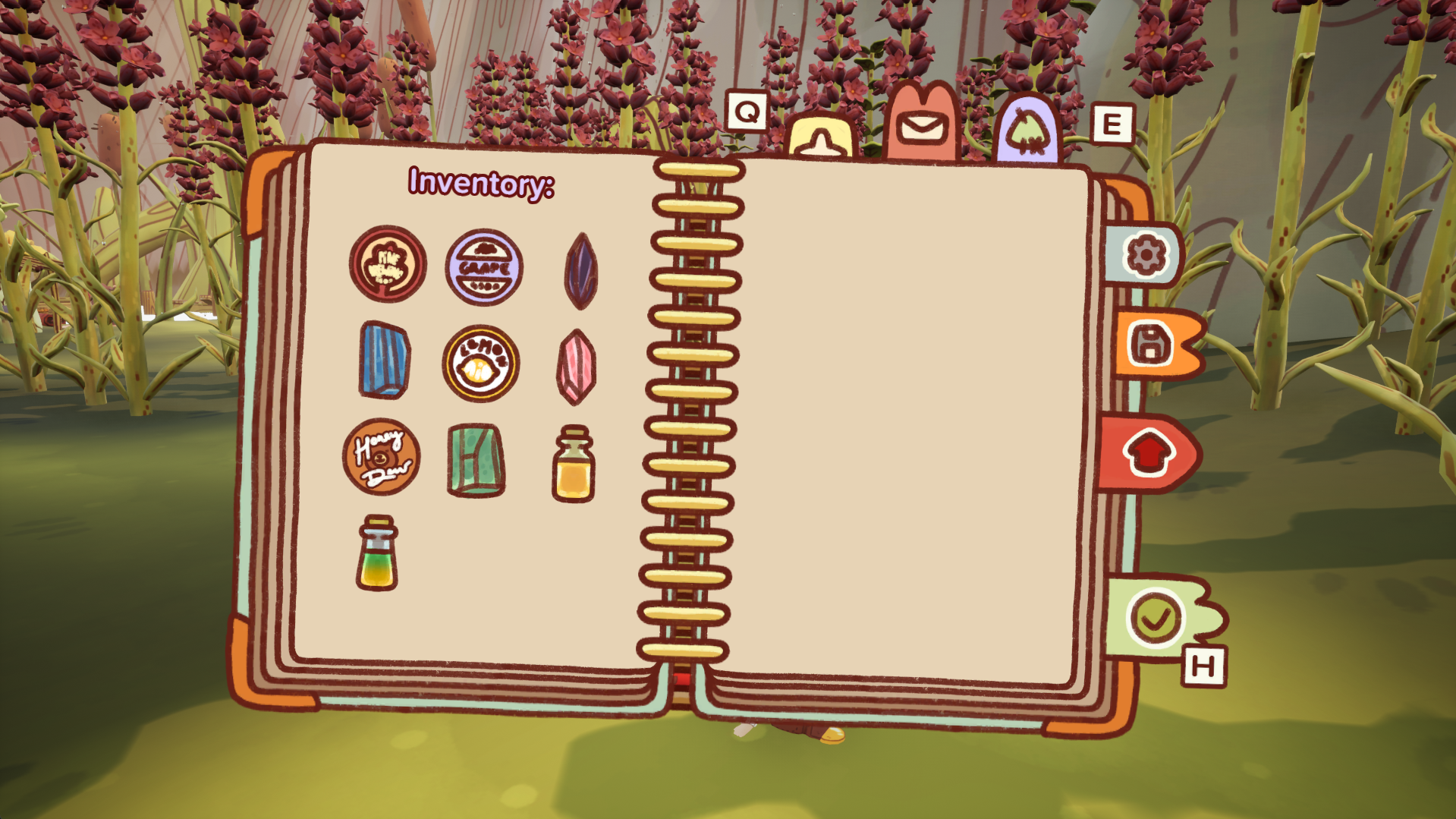
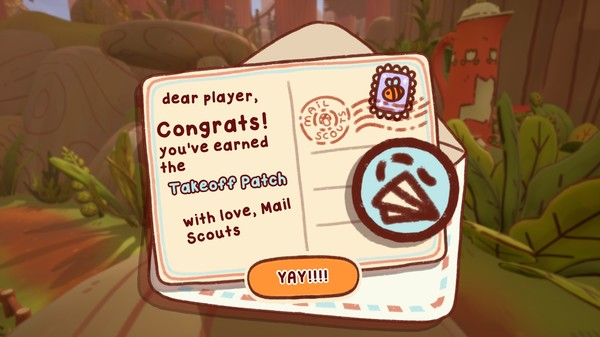
Screenshots from Mail Time (fig. 5, 6, 7)
Mail Time: I love how the UI is integrated into the theme so well, and how it doesn’t pull the player out of the experience. I really like how visual the dialogue is, with the 2D versions of the characters and being greyed out when they are not speaking.
Minigame idea: Spotlight
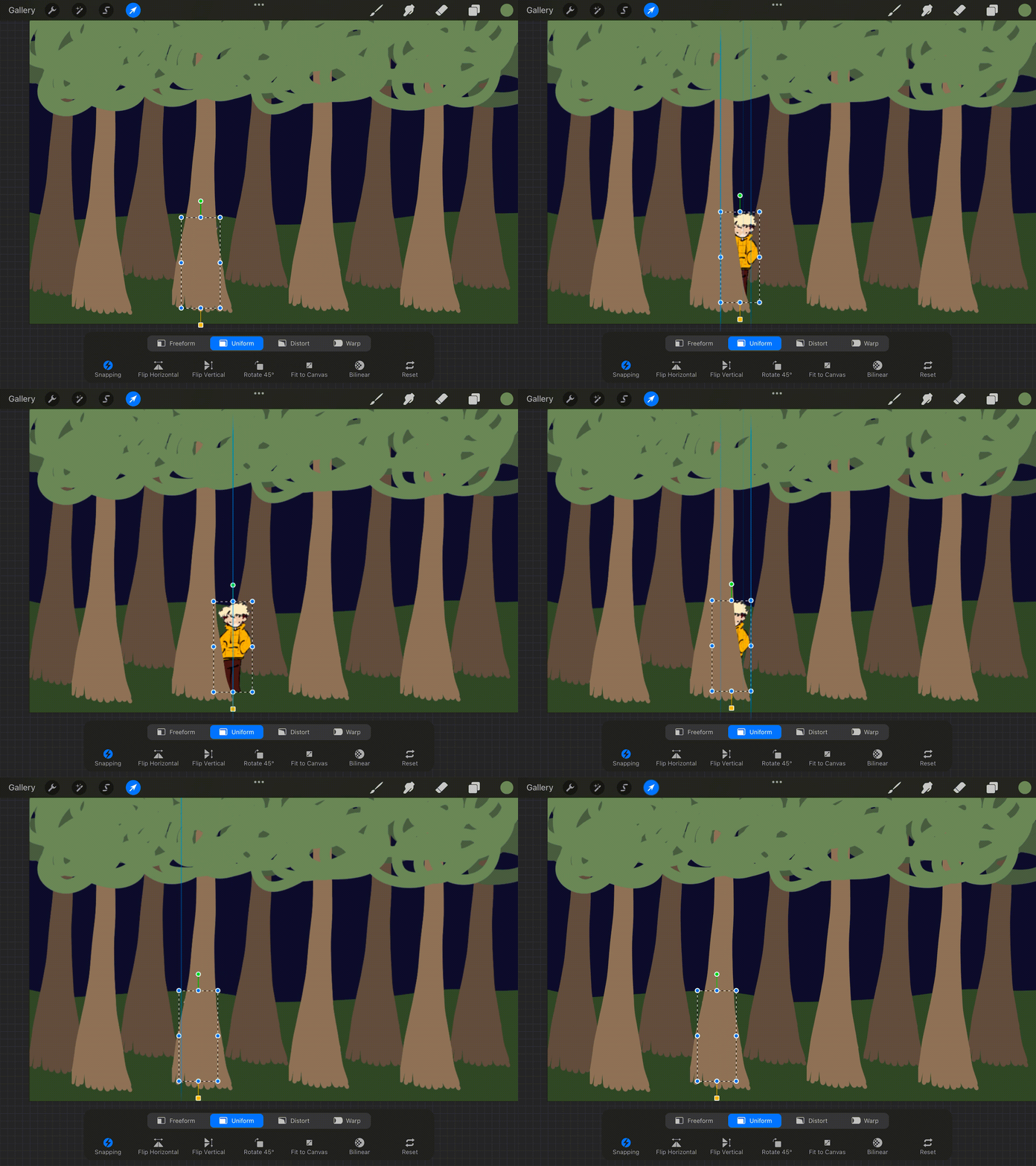
Two ideas for a spotlight game. First one (vid. 1): Alex moves out from behind trees and you have to click on him, maybe sometimes it’s a random forest animal and you lose points if you click on those. Could do something with the wolf behind trees as well later in the game. Second one (vid. 2): Ernest is holding a flashlight and has to find Alex in the dark, maybe Alex moves every now and then.
Idea 1 (vid. 1)
Idea 2 (vid. 2)
Minigame idea: Solitaire
One of my first minigame ideas was solitaire. It’s a classic game I often played when camping, and I just felt like it fit the vibe really well. I followed this tutorial and created a basic version of the game (vid. 3). I used royalty-free assets just to create this prototype, but obviously we will design our own playing cards later on. While this tutorial was a very good place to start, there are a lot of things about the minigame that I want to alter, including being able to drag the cards around instead of clicking, changing the deck so that there are always 3 cards on display (with exceptions of the first flip), and adding an undo function.
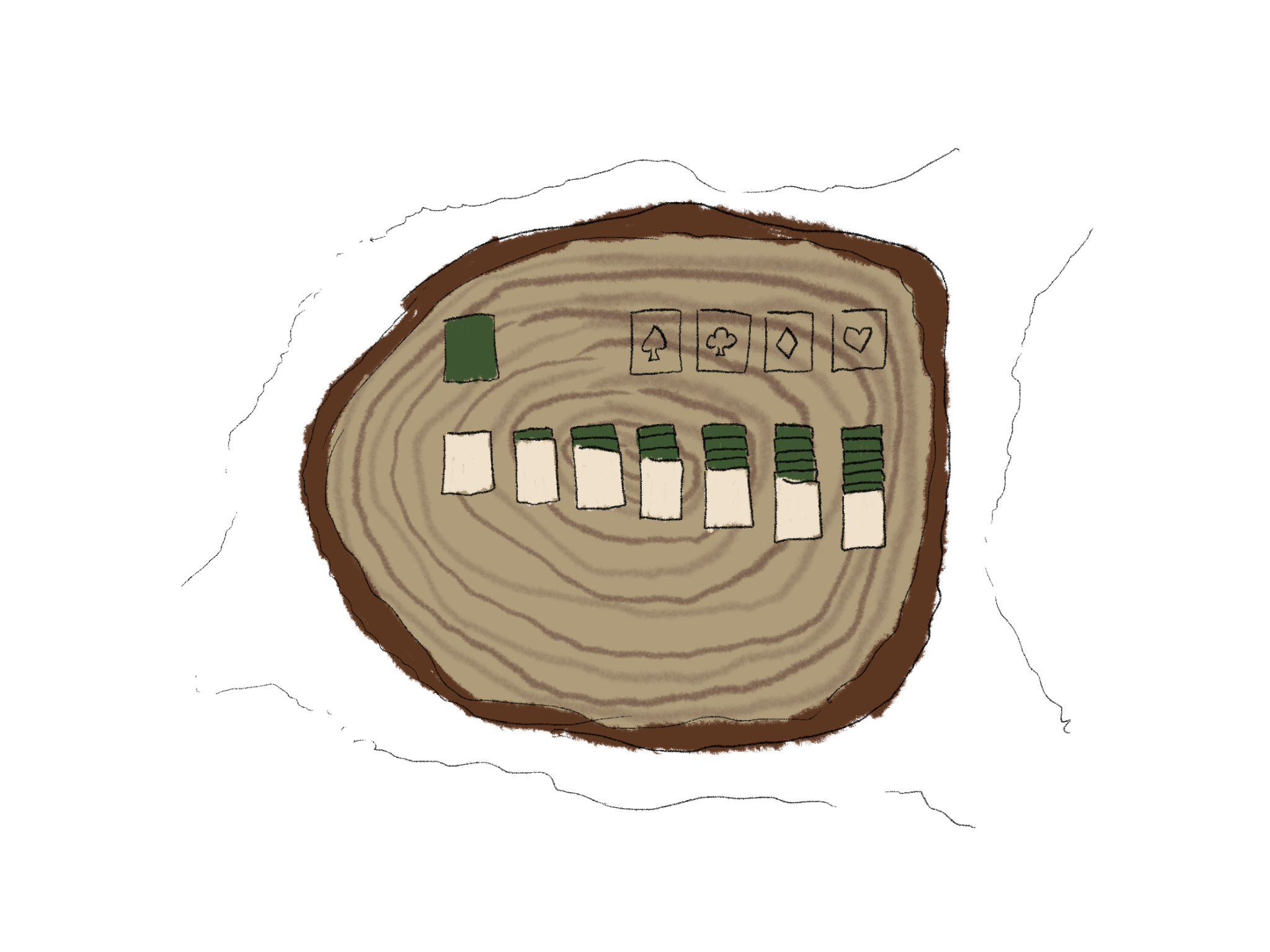
Sketch of layout/theme in game (fig. 8)
Basic Solitaire I made in Unity (vid. 3)
Other Minigame Ideas
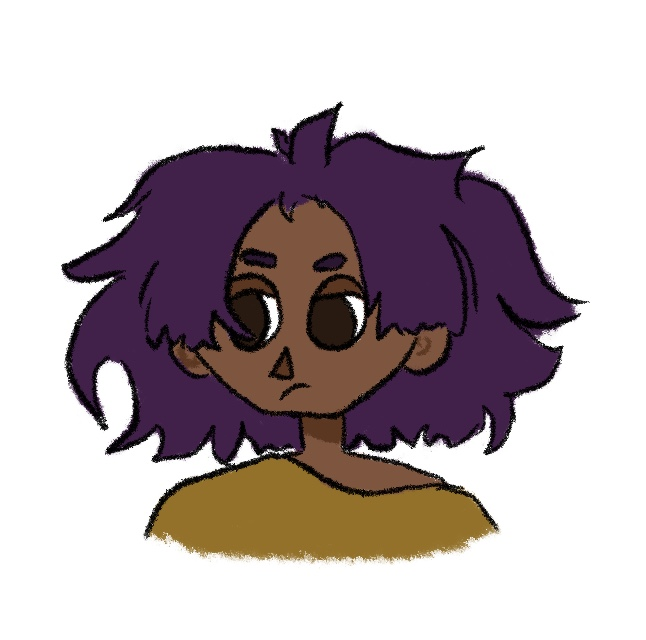
Character Designs
- unpacking,
- collecting/sorting bugs, leaves, twigs,
- marshmallow toasting,
- fishing,
- cooking,
- sneaking past other students & teachers,
- campfire song,
- spider/mosquito squashing
We want all of the minigames we include to feel natural in the setting and narrative. The games will be available to the player once they reach a certain dialogue or plot point, so as they play more, they unlock more minigames to enjoy.
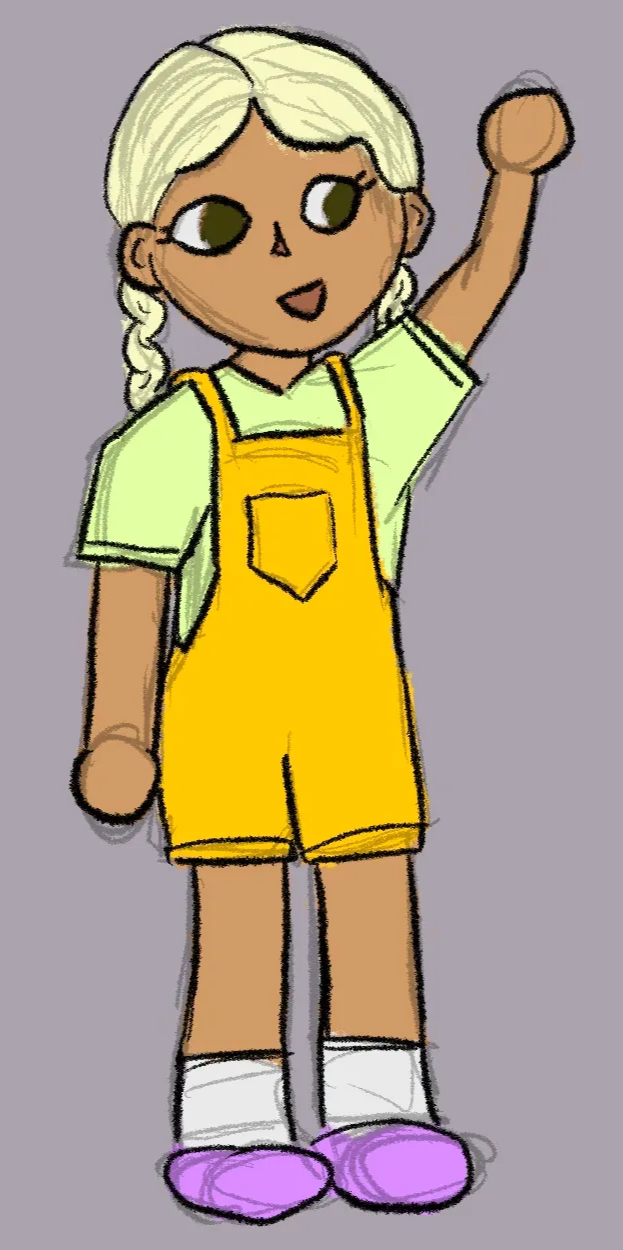
We decided that we wanted around 8 or 9 students and a few teachers, so me and Lily both sketched a few designs. These three are my designs. I tried to keep to the same art style as Lily, but she will redraw these characters when we need to add them to the game.
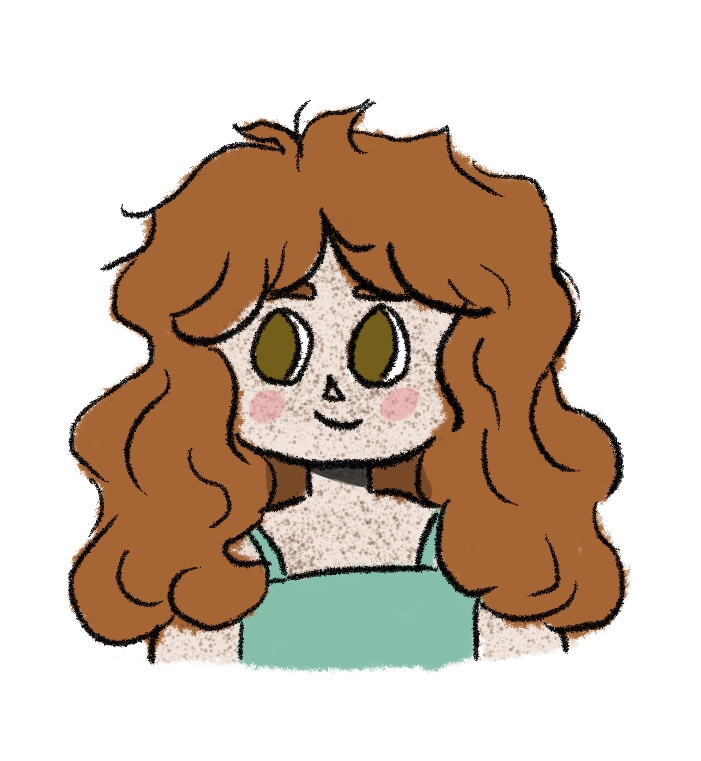
Three characters I designed (fig. 9, 10, 11)
Week One
Research Question
Gameplay
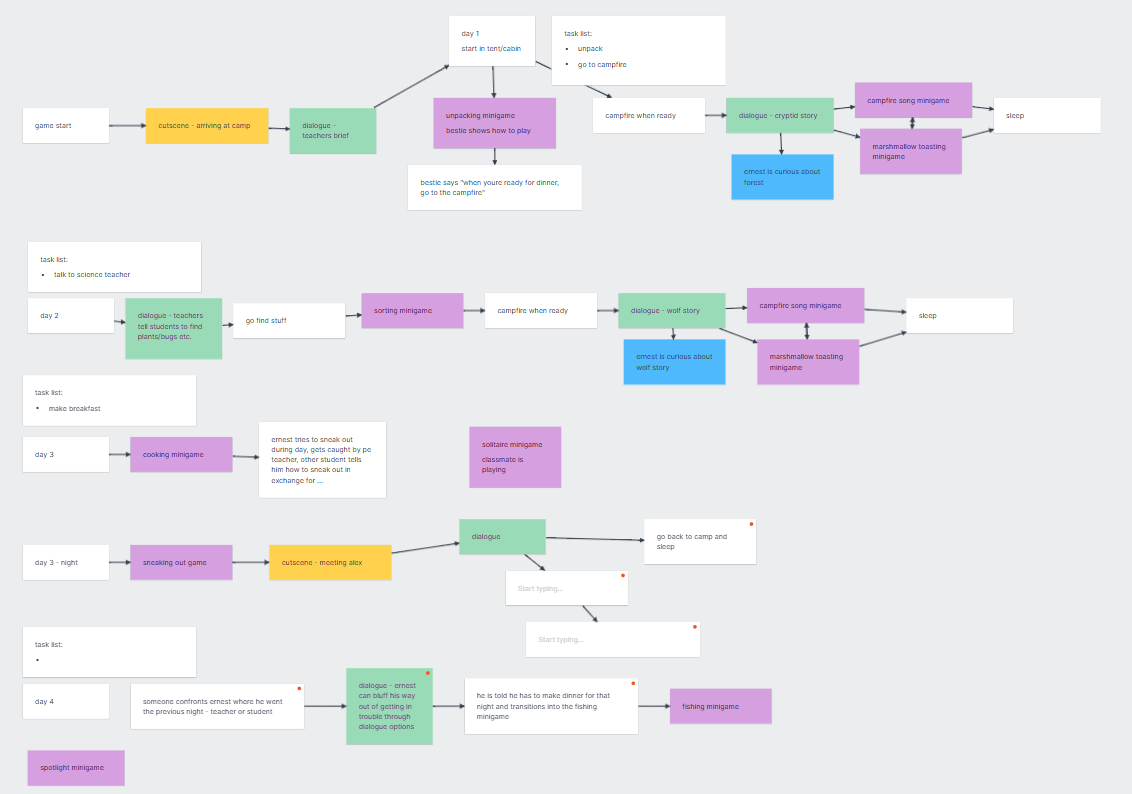
We started thinking about our research questions, and I was very unsure of mine. The elements I will mainly be focusing on while developing our game are the coding and mechanics as a whole, but also how to integrate the minigames into the storyline, as well as helping Lily with the narrative, dialogue, and gameplay. Because I really enjoyed designing the playing cards as a subtle environmental storytelling feature, I thought I could focus my research around that.
“How can I use environmental storytelling in minigames to subtly foreshadow and subconsciously influence the audience's actions/thoughts?”
We started a flow chart of the timeline of the gameplay. We broke it down into day cycles and colour coded all the different events (purple for minigames, green for dialogue, yellow for cutscenes, blue for thoughts, and white for others). We roughly planned out about 5 days, but will pick this up later, probably in the second semester when we are working more on the game as a whole rather than just skills and elements we want to learn and develop.
Game timeline (fig. 12)
Playing cards
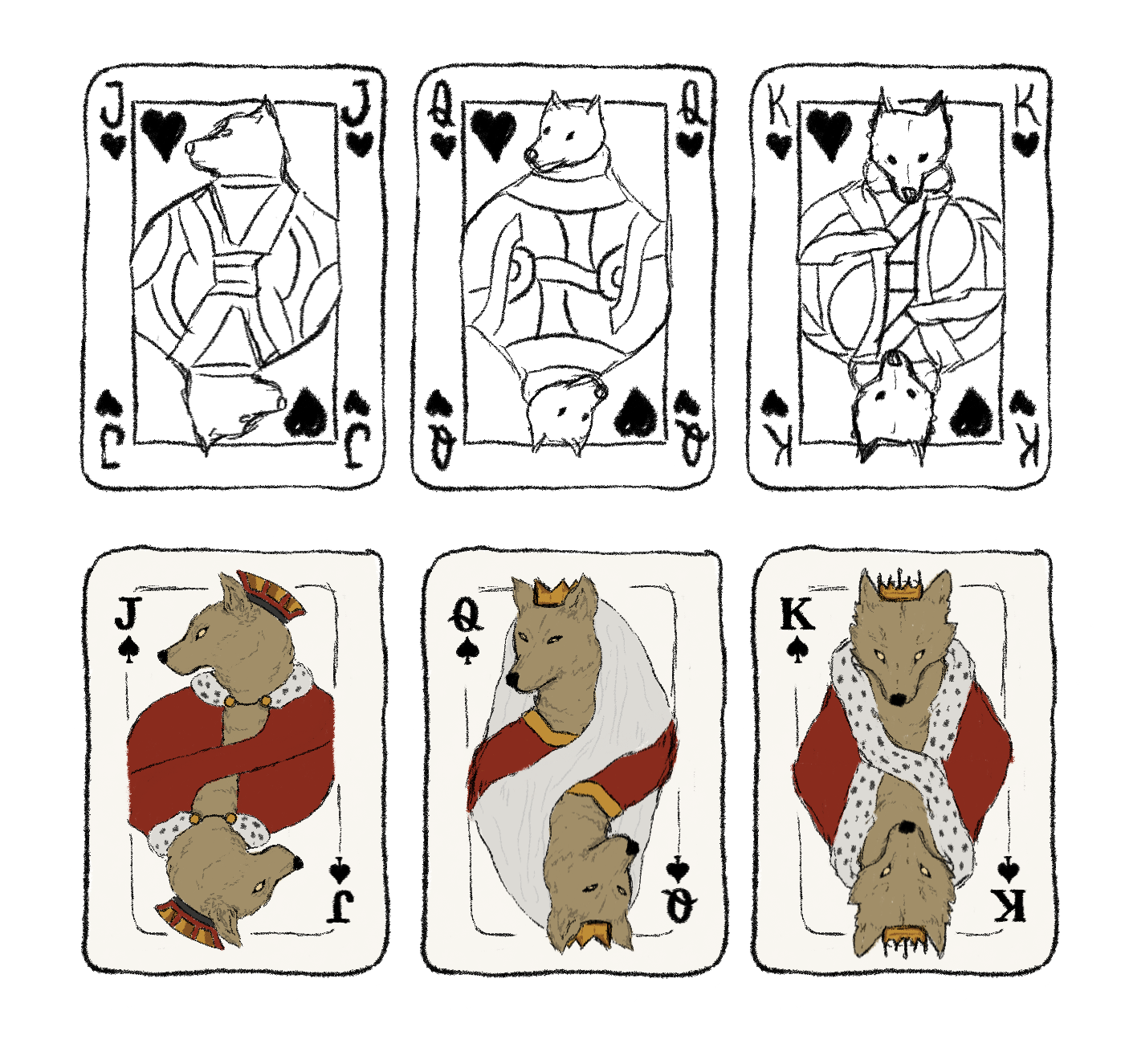
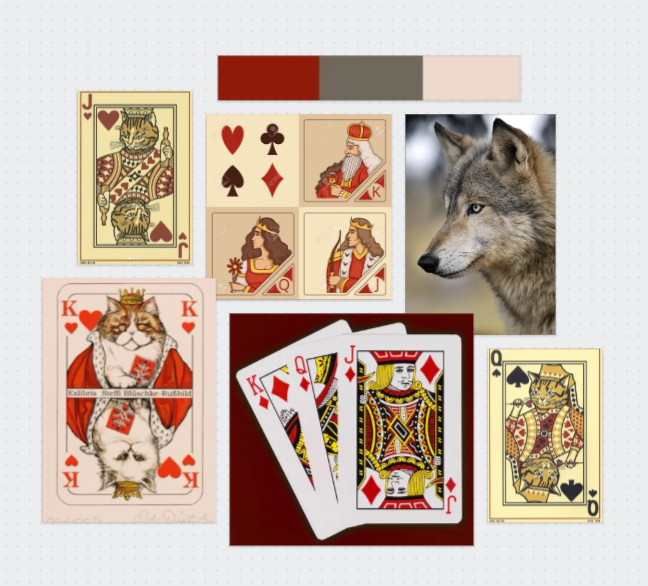
I thought it would be cool if the playing cards had wolves featured on them, as a subtle storytelling. The top row (of fig. 15) is my initial sketches, wolf heads on traditional playing cards. I liked the mirrored images but would want to use a different style that would be more cohesive with our game. Using Lily’s sketch of Alex as a wolf (fig. 13) as reference for the style, the designs on the bottom row (of fig. 15) are what I came up with.
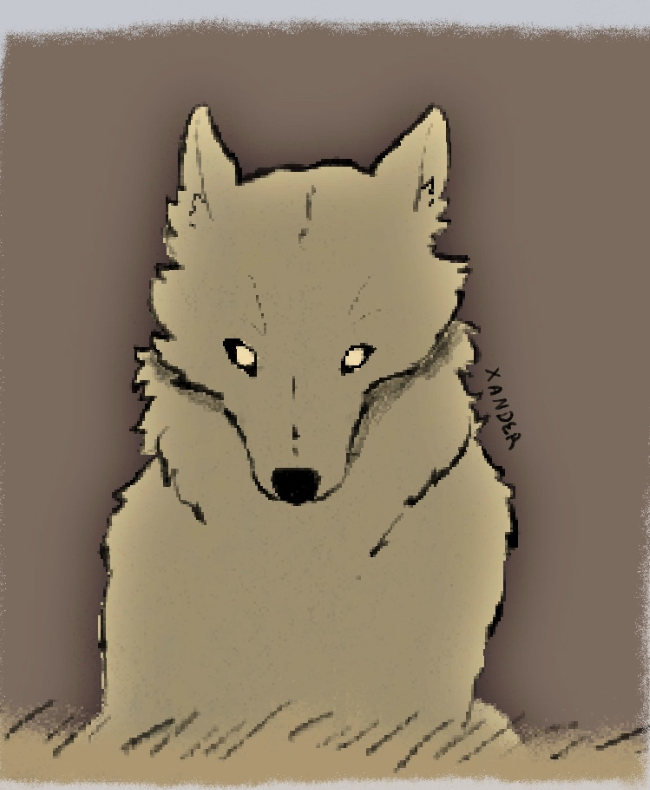
Drawn by Lily Ahmad-Davis (fig. 13)
Moodboard I created (fig. 14)
Playing card designs (fig. 15)
Week Two
Prototype
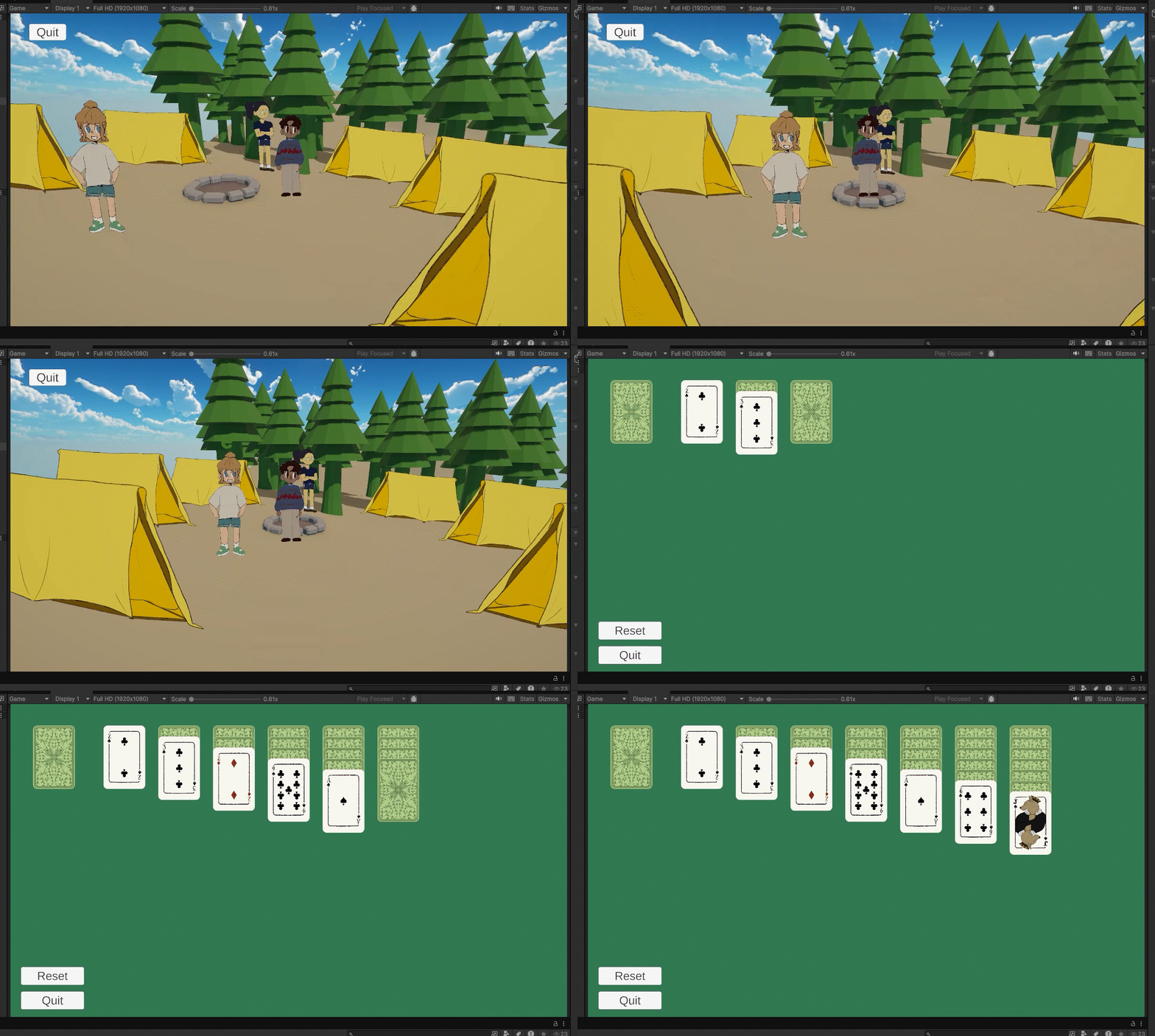
I’m not happy with my research question, I thought about it and I will mostly be focusing on coding and mechanics rather than visuals and narrative, so I want my research to reflect that. Brooke and Gabby helped me change my question, and this is what I settled on.
“How can I create a game that integrates minigames to enforce and support narrative to design an experience that subverts visual novel expectations?”
Interacting with other students (vid. 4)
Interaction to start Solitaire minigame (vid. 5)
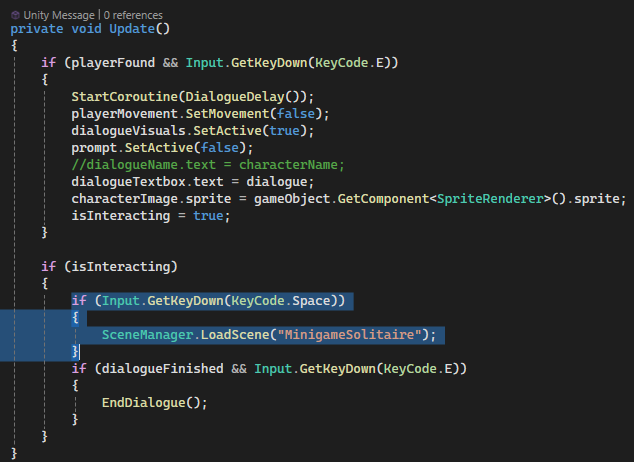
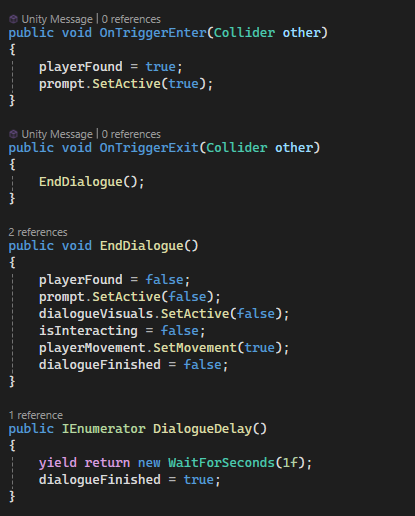
We made a basic prototype for our game. Lily made the assets and arranged them, then sent it to me as a prefab so I could connect everything up. So far there is only a few basic scripts: player movement on Ernest, and NPC interactions on the students. For the dialogue, I tried to follow Masaya’s scripts from first year, but I couldn’t get it to work (I later found out this was because I needed to mod Unity), so I wrote a simple script to use for now. I know this script will not be practical in the long run, but for now it worked.
Playing cards
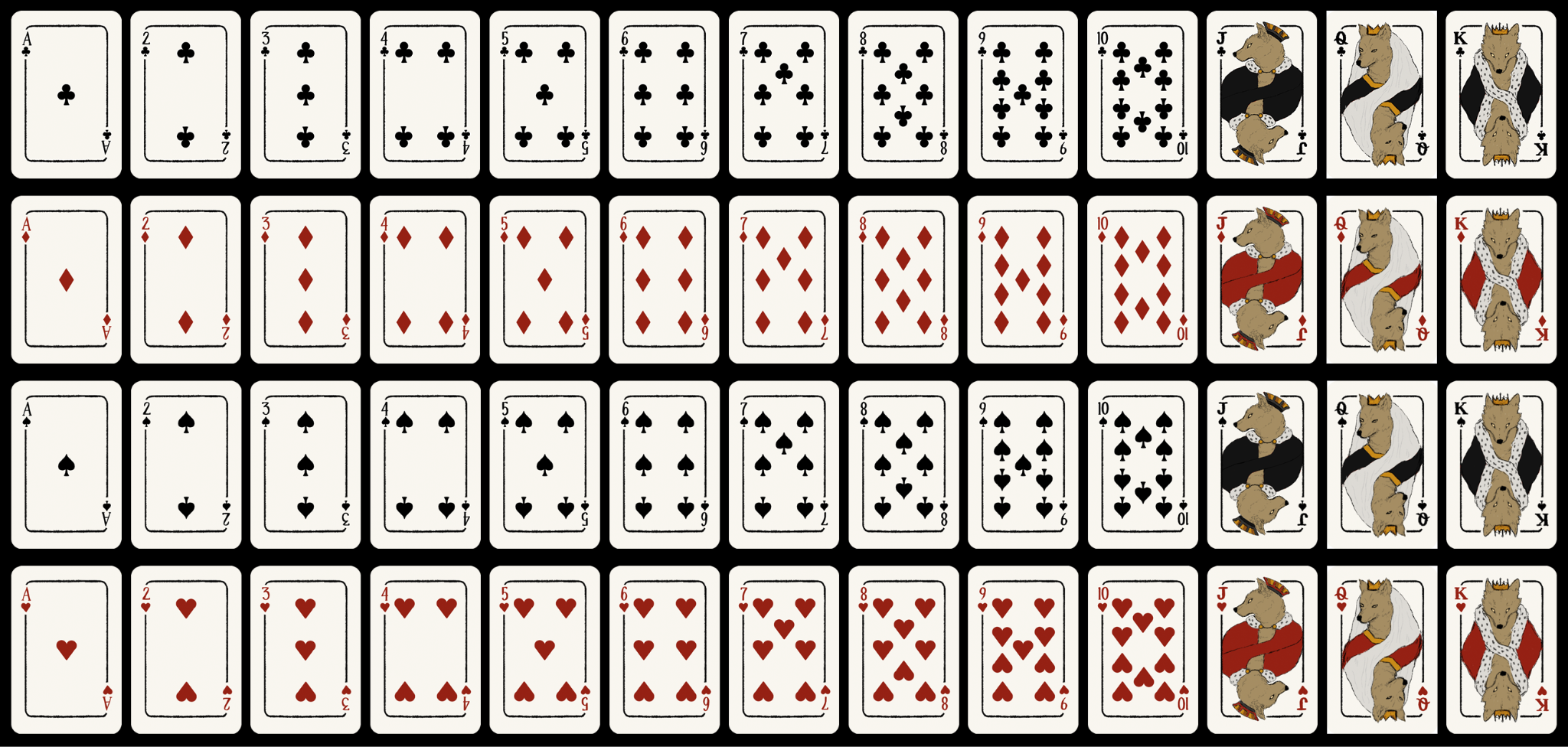
Full deck of Playing cards laid out (fig. 16)
Simple dialogue script (fig. 17, 18)
Week Three
Yarn Spinner for Dialogue
Masaya recommended that I use yarn spinner for the dialogue in our game. Yarn spinner has been used by many successful games, including Night in the Woods, which is one of my main inspirations for the game as a whole, including the dialogue. I personally found the written tutorial hard to follow, but I managed to get it set up and implemented in our game. Overall, yarnspinner will help keep our dialogue and scripts tidy and organised, and will be much easier to edit dialogue flow and appearance.
I created a second dialogue script that I edited slightly to attach to a box collider in front of the forest, so that when the player gets too close, dialogue pops up with the teacher instantly, rather than the player having to interact with the forest or the teacher.
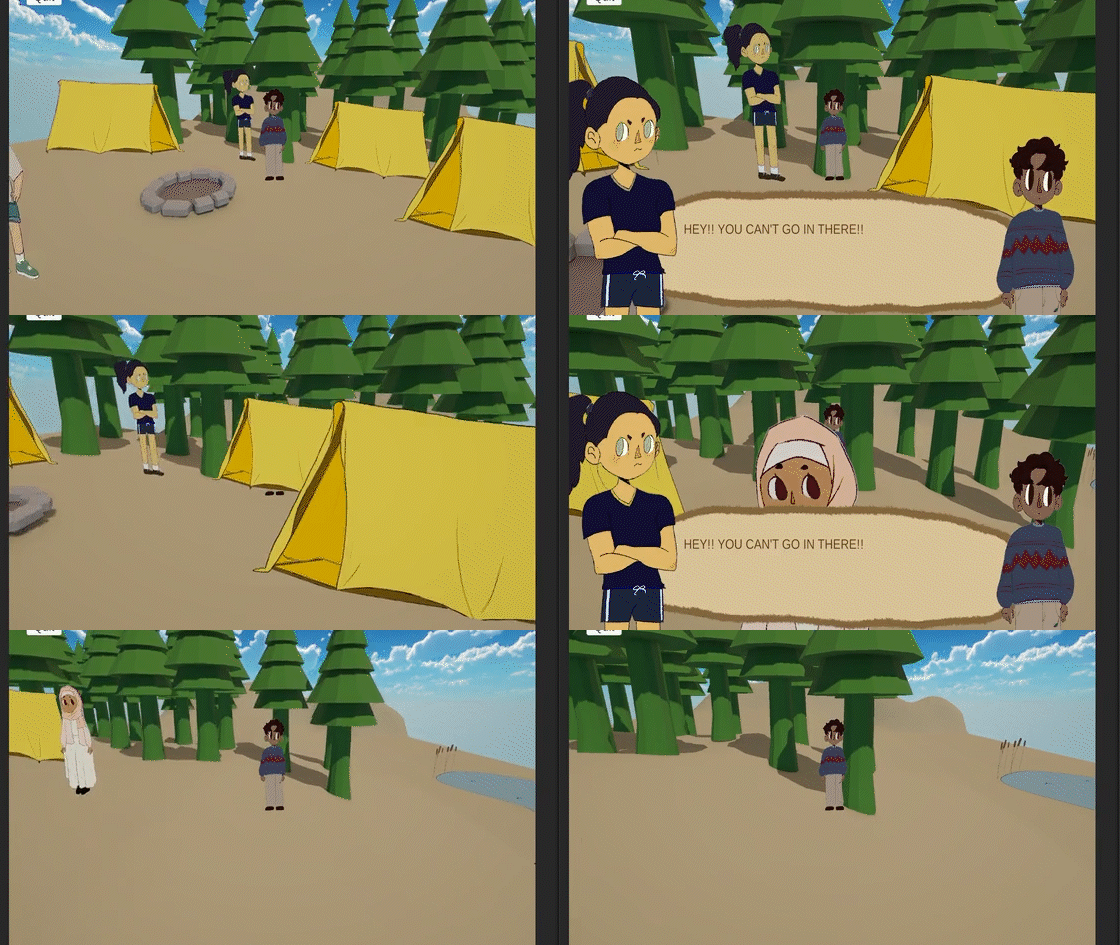
Dialogue when at the forest border (vid. 6)
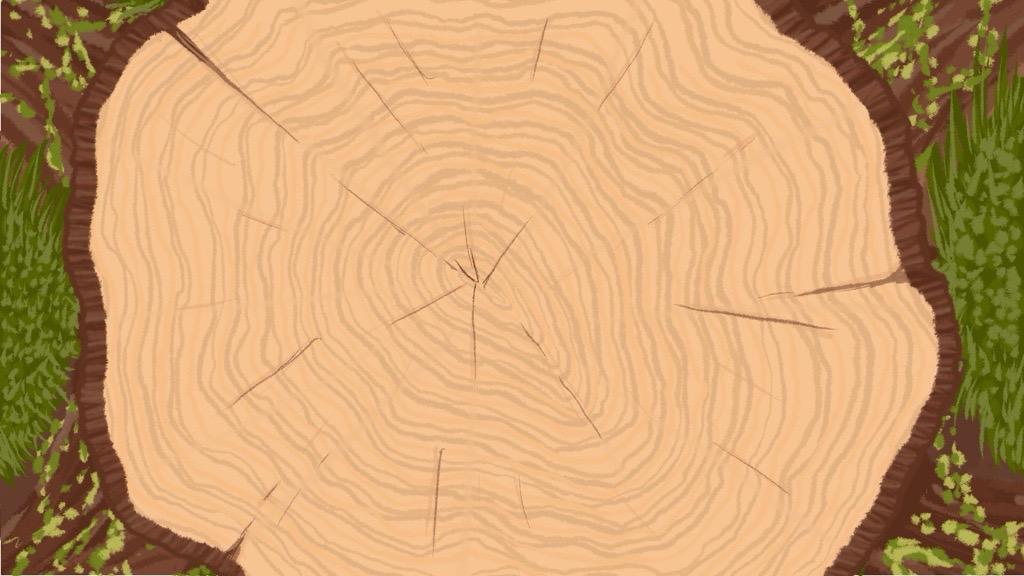
Background I drew in Procreate (fig. 19)
Solitaire Minigame layout with new assets (fig. 20)
Week One
Title Sequence
I added in Lily's draft title sequence into the starting menu using Unity timeline (fig. 1). It is a very rough draft at the moment, but I wanted to see how it would work since I haven't done much more than character animations before. While sitting in the Title Screen, there will be an idle animation of the bus, then when play is clicked, it will smoothly transition into the title sequence. We decided that a short scene to lead into the game would help to smoothly set the scene and go into the narrative without forcing it on the player.
Timeline
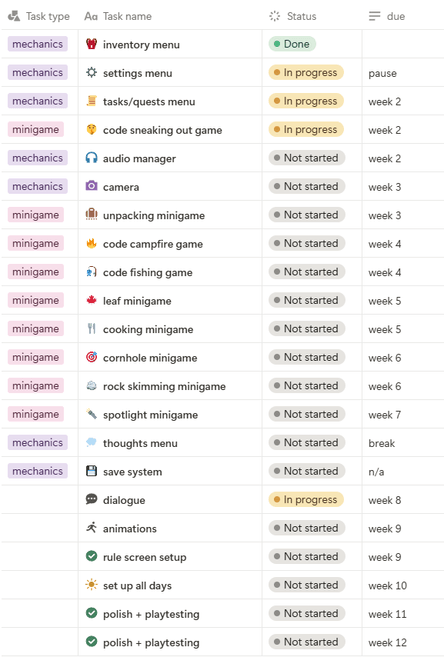
This is the timeline I have created for myself (Fig. 2). I will aim to make two minigames every week, but I have given myself a bit of leeway by leaving time in the mid-sem break in case I get sick or have other things on. I am focusing on the minigames before the rest of the mechanics since they are the most important part of the game for me, especially since my research question is concerning minigames.
Draft title sequence (Fig. 1)
Font
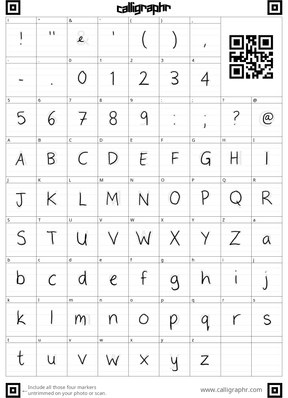
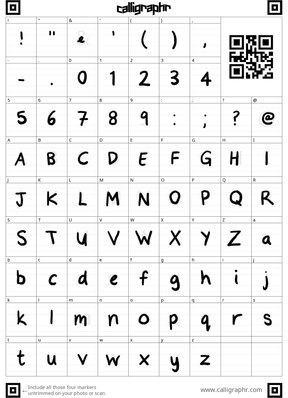
For the font we wanted a handwritten style since the menus are Ernest's diary. I looked at some free fonts but couldn't find any that fit, so I made one using Calligraphr. I made a regular and bold version. (Fig. 3, 4, 5)
Timeline (Fig. 2)
Regular Font (Fig. 3)
Bold Font (Fig. 4)
Font in Game (Fig. 5)
Week Two
Quest System
It is important to our game that there are quests. These are what will progress the story. I followed this tutorial. However, my game so far was set up in a different way to the tutorial, so I had to make my own changes. For testing, I wanted to make a simple quest for collecting a certain amount of flowers, so I added a function that finds the amount of the required item currently in the inventory when the quest is activated.
The tutorial used an event system for all of their components, which is not something I have done. However, because I didn't, I ran into a lot of issues trying to set up the quest system the same way. I attempted
to change my game to use an event system, but I messed up and it was a lot more complicated than I thought it would be. Github decided to be dumb and wouldn't let me revert the changes, but I managed to get it back to what I had before with some help from my dad. I will pause on implementing the quest system for now, it has taken a lot longer than I thought it would and I need to move on to making the minigames. I will come back to this later since I'm also still considering if it would be worth it to try add an event system again since my game isn't that large and won't need to handle a lot of quests at once.
I also added in the audio manager, I followed this tutorial by Brackeys.
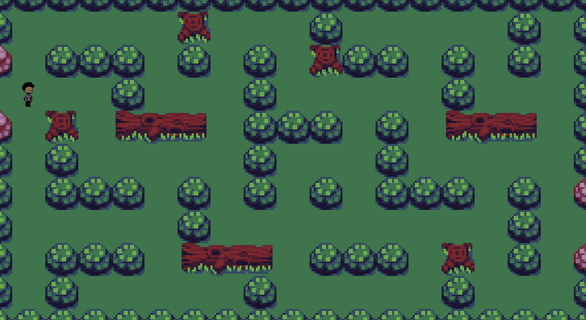
Sneaking Minigame (Fig. 6)
Sneaking Minigame
While I had already made a sneaking out minigame, it was very basic and boring. We wanted our minigames to be puzzles, to not just be an interactive part of the story but something the players will want to do again. I thought a kind of cat and mouse game could be good, where the player and teacher each take turns moving, and the player is trying to get past without being caught (fig. 6).
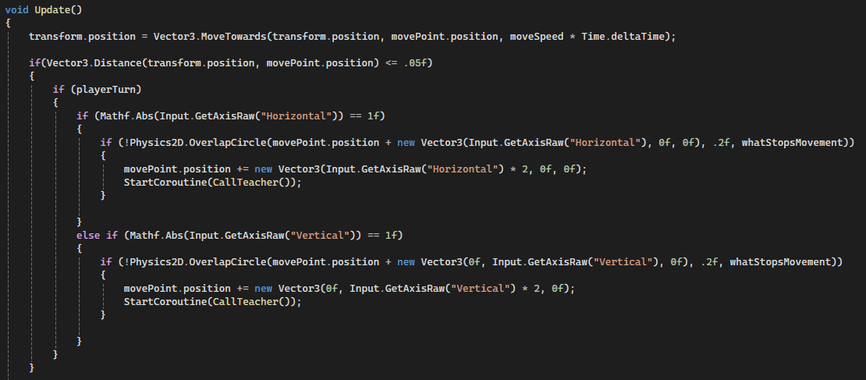
For the movement, I looked at using the grid system. For now, I found a free tilemap to use as a placeholder. I made this simple Player Movement script (Fig. 7) that uses the horizontal and vertical inputs to move two spaces at a time so it goes to the corners. To prevent the player simply walking through obstacles, before the player moves, it performs a check to see if there is an obstacle one block in front (like a hedge or log) and if there is, the player doesn't move.
Sneaking Player Movement (Fig. 7)
Week Three
I was sick this week so I didn't make as much progress as I wanted to.
Sneaking Minigame (cont.)
For the teacher movement, I followed this tutorial using a star pathfinding algorithm. It uses nodes to tell the teacher where it can move to from each spot (Fig. 8). For some reason, it was not working when I copied the tutorial, I went back over it several times, so I copied their script into mine and it worked, but unfortunately it had saved and wouldn't let me go back to see what I had done wrong.
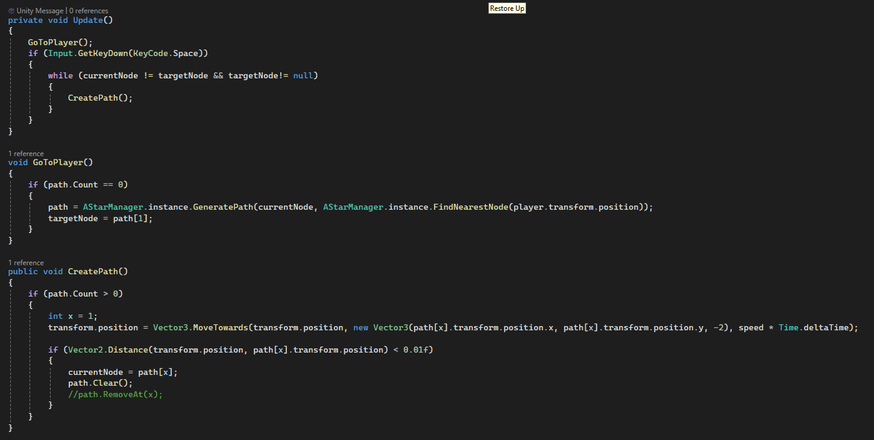
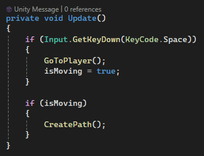
I wanted to make the teacher glide rather then jump to each spot. I made a silly mistake and used a while loop in the Update function (Fig. 9) which caused Unity to crash as soon as I tried to run it. I added a new bool called isMoving (Fig. 9a), and used an if statement to tell it when to move.
The tutorial was written in a way that the teacher would continuously move towards the player, however, I want them to take turns. I added a public bool that was turned true and false when the player and teacher moved.
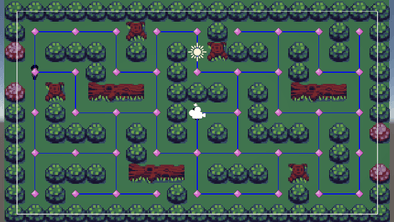
Pathfinding Visuals (Fig. 8)
Teacher Movement Script (Fig. 9) Red outline (Fig. 9a)
Week Four
Rhythm Minigame
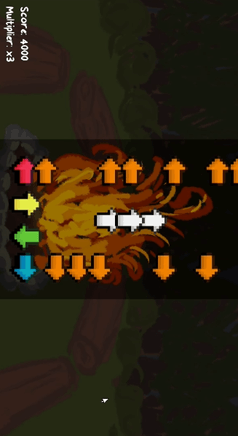
We wanted to have a rhythm minigame around the campfire, like singing songs around the campfire. I followed this tutorial by gamesplusjames for the basic gameplay. The part that took the longest was trying to make the arrows line up with the song. It was set up in a way that each beat should be exactly 1 space apart, but the rhythm isn't exactly on the beat, often on the half, or sometimes even quarter. I tried a few methods to line up the arrows. First I tried manually placing them a few at a time then playing the song to test it, but this was taking a very long time. The song is 1 minute 30 seconds and I could only do a few seconds at a time. I then tried adding arrows on every beat and making them turn red when I pressed on the beat, but most of the time 2 arrows would light up or none would (Fig. 10). I then set it so an arrow would be instantiated every key press, then I used those to line up the arrows on the correct beats (Fig. 11).
I'm taking a lot of inspiration from the 'Night in the Woods' rhythm minigame. The current assets are placeholders and will be changed to be pixel art and to fit better with the camp theme, so maybe look like a guitar. I did add in the scoring system, but I think I will change it to just show your highest streak and misses and things like that. The multiplier and current score system feel too arcade-y.
Creating Notes (Fig. 10)
Creating Notes (Fig. 11)
Unpacking Minigame
This is going to be the first minigame the player will play, so it is a fairly simple one. We have not decided yet if the player will be able to come back and play this one like they will with the others beacuse if they do not unlock new items, what is the point in rearranging the room? It is very simple, you get the items from the bag then place them in their highlighted spot (Fig. 12). The assets are not finished yet, Lily is working on them. If we want this minigame to be replayable, I would need to alter it so items could be placed anywhere, and there would need to be more customisation available which I don't think would suit the game, so we probably will not be doing that.
I had some trouble when trying to make the held item know when it was over the outline and therefore able to be placed. I tried OnCollisionEnter, OnTriggerEnter, Physics Overlap Circle, and even manually checking the transform position. The thing that worked was using a raycast on the Z-axis to detect if the outline was behind it.
Unpacking Minigame (Fig. 12)
Week Five
New Font
Since we changed the artstyle to be pixel art, we needed a new font. I created this one, I think it will be good for headers and titles, but I don't know how well it will work for smaller text like dialogue and item descriptions. We will test it out, but we might need a new font.





Fishing Minigame
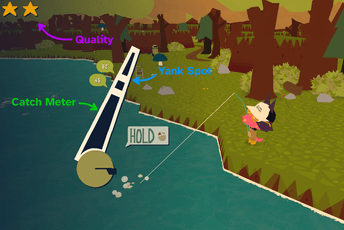
I have been taking inspiration from a few games for this, mainly 'Webfishing'. Their mechanic works by filling up a catch meter and then mouse clicks to get past the yank spots (Fig. 13). The more rare the fish, the more clicks are needed. I have decided to use a similar mechanic. Every second or so, a button will appear on screen with a random letter on it and the player has a limited amount of time to press the button. Each press will draw the fish in, but missing one will either release the fish or just put it back a few spaces. I am still developing this minigame, I plan to finish it in week 6.
Webfishing fishing mechanic (Fig. 13)
Rhythm edits
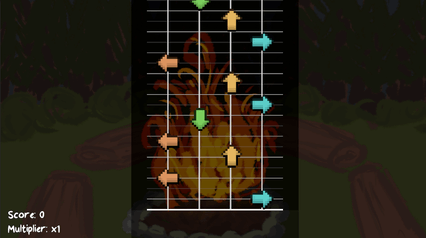
Before playtesting in week 6, I made a few changes (Fig. 14 and 15). I thought the arrows looked too clunky so I reduced the size slightly and got rid of the arrows at the bottom of the screen. This might be something I change back since now there is no feedback when you press a key, but I'll see how it goes during playtesting. I also added lines in to look like a guitar and to hopefully make it more clear what order the arrows need to be pressed. These still aren't the final assets, the background will be pixel art, and we are going to use WASD instead of arrows to match the rest of the game's inputs, so I will make keys to replace the arrows. This should also help to reduce the clutter on screen.
Original Rhythm layout (Fig. 14)
New Rhythm layout (Fig. 15)
Annotation - MDA Framework
Hunicke, Robin & Leblanc, Marc & Zubek, Robert. (2004). MDA: A Formal Approach to Game Design and Game Research. AAAI Workshop - Technical Report. 1.
Originally proposed by LeBlanc, Hunicke, and Zubek (2004), the MDA framework (Mechanics, Dynamics, Aesthetics) is a model for analysing and designing games. It separates games into three building blocks: Mechanics, the basic rules and systems such as player controls, enemy detection, algorithms; Dynamics, the behaviour that results when the mechanics are enacted during play; and Aesthetics, the emotional responses elicited from players from the dynamics. Players primarily engage with the game starting from its aesthetics, like looking for games that fit a specific genre, designers typically start with the mechanics to produce the intended experience.
This framework has changed the way I look at designing minigames. For our capstone, I am creating the minigames to work with Lily's narrative. If the resulting player experience, the Aesthetic, doesn't match the narrative, the minigames feel disconnected and break the immersion. Using the MDA framework, I can trace back to the mechanics and edit them to create the response I intended. For example, in my rhythm minigame, there is a scoring system that creates a competitive feel since that is how rhythm games are usually scored. However this does not fit with the vibe of the overall game, it is meant to be a nice minigame to play at the campfire before bed, not stress the player to get the highest score. I can see the Aesthetics are not what I intended, so I will go back to the Mechanics to change the scoring system, which will change the Aesthetics from competetive to calm.
I will find the MDA framework a practical tool that will help me design the minigames more efficiently in a way that blends seamlessly with the Aesthetic of the narrative. By first considering the emotional response I want to evoke, the Aesthetic, I can then identify the required dynamics and mechanics. This approach supports iteration and helps ensure my design choices stay consistent with the intended player experience.
Week Six
Playtesting
We did playtesting in class this week, it was very helpful and fun to see everyones games and get feedback on our own. I put the Rhythm, Unpacking, and Sneaking Out minigames out for playtesting.
Unpacking
The main feedback I got for this was to add something to indicate when you are done. It is quite plain right now, so maybe add some more output for the player to know when they place it right. Someone suggested to add another minigame inside this one to fold the clothes yourself which could be interesting to add. It would also be cool to lay down the bedding yourself, unroll the sleeping bag etc.
Rhythm
The main feedback was there needed to be some sort of feedback for the player to see when they press a key. This is something I had but had taken away because I thought it looked clunky. I will definitely add it back in, or something to the same effect. It was also mentioned to add an indicator if the button is pressed too late or early, and penalties for missing since right now you can spam the keys and not get any penalty. This is already something I was thinking of adding, so I will definitely do it soon. Someone suggested increasing the scroll speed to increase the space between the arrows which I think is a good idea because it can be hard to see the difference in placement. Someone recommended adding more songs which is something I would like to do to increase replayability, but it will be something I do later.
Sneaking Out
The main feedback was that it was too easy, once you get in front of the teacher they cannot catch up. I think this is more an issue with the map rather than the pathfinding, but I will definitely adjust the map to be more difficult. Someone suggesting adding intense music which I think could work well, it would stress the player out and they would be more likely to make a mistake. Another important bit of advice was that the teacher should catch you if you are in eyeline, not just when she is next to you. I like this, it makes a lot more sense in this context, so I will add this in or I'll adjust the map so that you are only within eyeline when you are next to her.
All of this feedback was really helpful, and I got a lot of inspiration from all the other games I played.
Annotation - Self Reflection
From weeks 1 to 6, I have developed almost four minigames: sneaking out, unpacking, rhythm, and fishing. Although I am slightly behind my timeline due to a few reasons, I think I will be able to catch up over the mid-semester break. One challenge that set me back was the quest system which proved more complex than I thought. I followed a tutorial, but since I was using a different system than the video I struggled to implement the same features. I plan to scrap my original attempt and readjust my timeline accordingly. Despite this, I feel confident I will complete everything I have set out to do.
My design process has been influenced both by my research into experience-based play and, more recently, the MDA framework. These perspectives and my continued self improvement have helped me to better understand the code, mechanics, and player experience. Earlier in this semester and last, I often relied on tutorials but struggled when I needed to adapt them. Now I am much more confident in creating minigames independently, in seeing how the different elements combine to produce the intented outcome. Moving forward, I aim to reduce my reliance on full tutorials and will instead research specific problems as they arise while constructing the systems myself.
Looking ahead, it is crucial that I keep my research question in focus: How can I create a game that integrates minigames to enforce and support narrative to design an experience that subverts visual novel expectations? To answer this, I need to ensure that each minigame feels cohesive with the overall narrative. The methods and frameworks I have been engaging with will guide me in making design choices that maintain player immersion while also allowing for iteration and refinement as needed.
Week 7
Fishing
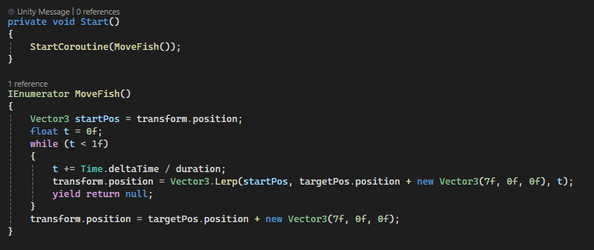
I got started with the fishing game. I made buttons for every letter created a function that instantiates a new one every second. When a button appears, it starts filling up with red, and once the red is full, you have missed that button and the fish will move back a space. I created a coroutine to move the fish (actually will look like a bobber in the scene) for testing (fig. 16). I tried using a Vector3.Lerp to make it move for 6 seconds to fishing rod, but I could not figure out how to pause it. Instead, I will try using Lerp to get the distance, then every correct button press will move it forward like 1/5 of the distance between the start and end point.
First iteration of MoveFish function (Fig. 16)
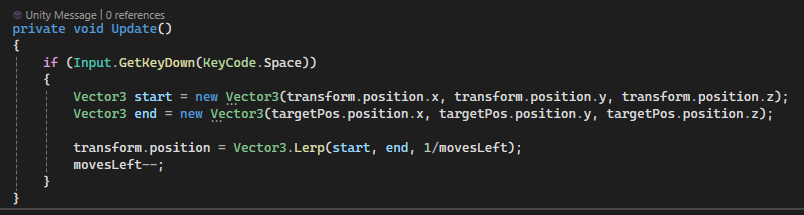
I rewrote the MoveFish function to just use the space bar for testing (fig. 17). I set movesLeft as 6 at the start (so 6 correct presses will make you win), and each key press brings the fish closer by 1/movesLeft - so 6 moves left, you press the key, then you move foward 1/6 of the distance, then next key press, you move forward 1/5 of the distance. This should hopefully keep all the key presses moving at the same rate.
Next iteration of MoveFish function (Fig. 17)
I didn't like how the buttons looked that I first made, they were just a plain square with the letter in the middle, and the filled up with red to show how long you had left. I wanted to create something that fit in with the minigame, so I decided to make it look like the keys were rising up of the water, and you have to press them before they sink again (fig. 19).
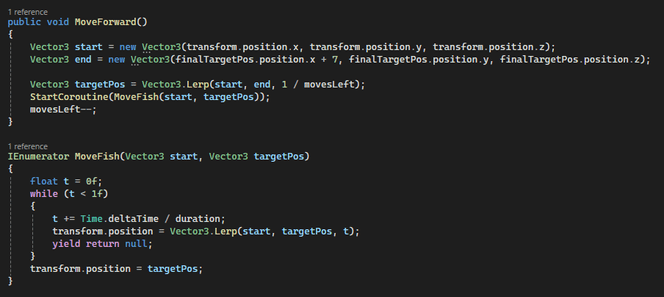
I cleaned up the script a bit (fig. 18). MoveForward is called when you press the correct key, which then calls MoveFish, a coroutine to make this fish move smoothly. I have it set that the button spawn frequency will match the time it takes the fish to move a place, so it keeps everything in sync.
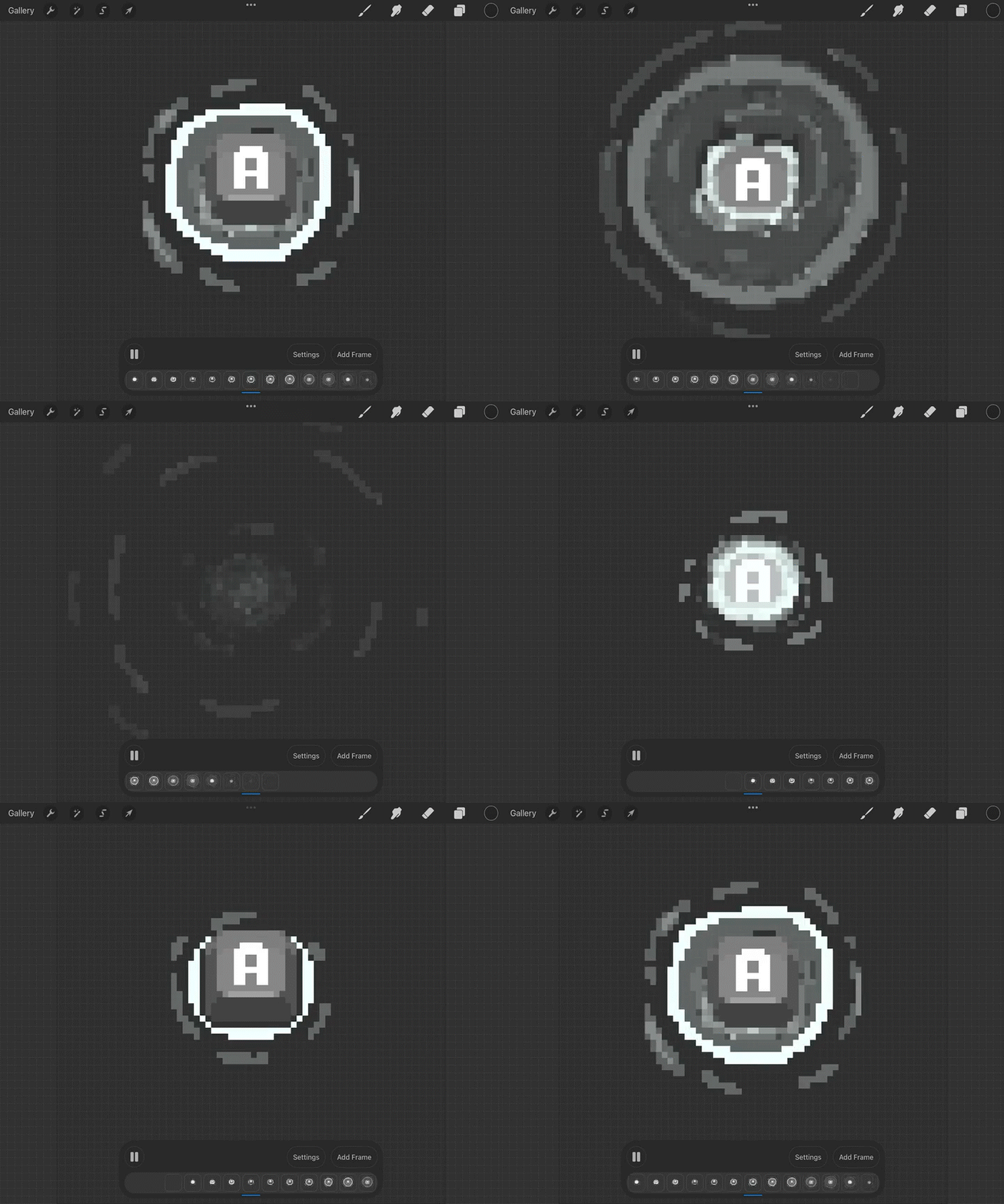
Fishing button animation (Fig. 19)
Final iteration of MoveFish function (Fig. 18)
Mid-Sem Break
Timeline changes
I've decided to make some changes to my timeline, I'm futher behind than I wanted to be, and feeling quite burnt out so I need to manage my time better. I will use the break to catch up a bit, but I've decided to scrap two of the minigames - cornhole and rock skimming - since neither are really puzzle games, and were just added so we would have more. I will aim to finish up the bulk of the minigames by the end of the break, so I can spend the next half of the semester making the whole game functional all together.
Cooking Minigame
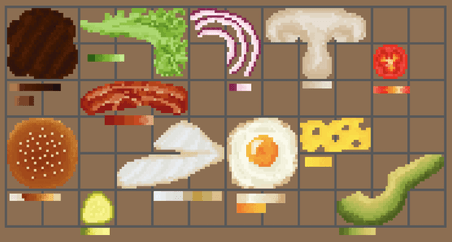
I took on all the assets for this minigame, it was good to have a break from coding and Lily has a lot of art to do. We decided to make the cooking game like a block game where you fit all the pieces into a specific outline. All the pieces are going to be burger ingredients (fig. 20), to make different levels, all the students will have different orders. I made each ingredient fit a different block shape, and tried to get as much variety as possible. Each student having a different order is a good way for us to actually tie the game in to the narrative and not have it feel like a random minigame, and also allows for some subtle environmental storytelling, like what ingredients each student asks for.
Food items drawn in Procreate (Fig. 20)
For this minigame to work as intended, the food items need to snap to the grid in the correct way. I tried a few different methods that didn't work, so decided to go back to the start and try again. I first made a function that detects if the food is over the board, and if it is you can place it down, otherwise it gets sent back to its start position (fig. 21).
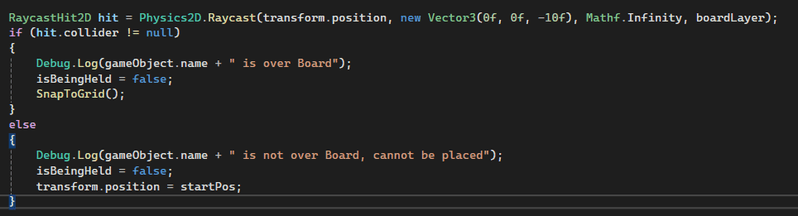
First iteration of placing food items on grid (Fig. 21)
I added a few raycasts to each food item, one in each spot it would occupy in the grid (fig. 22). When you let go of the item, this function checks if every raycast is above the board. If they are, it gets placed, and if even one isn't, the food is sent back to its starting position (fig. 23).
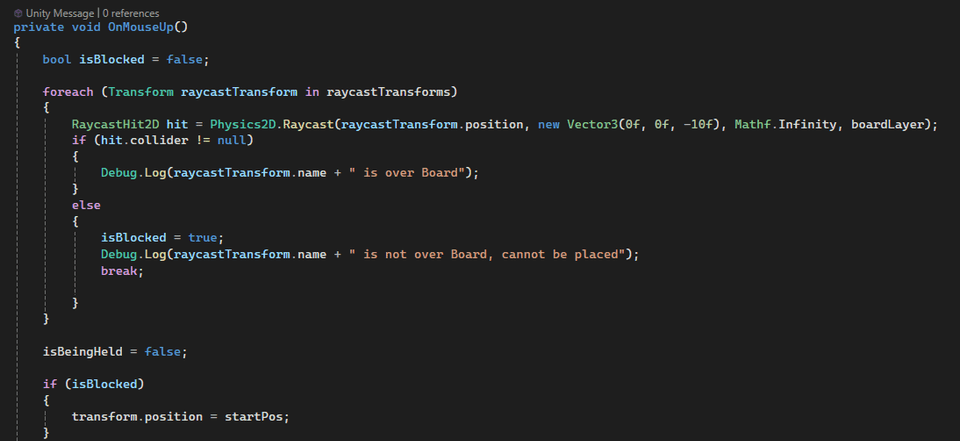
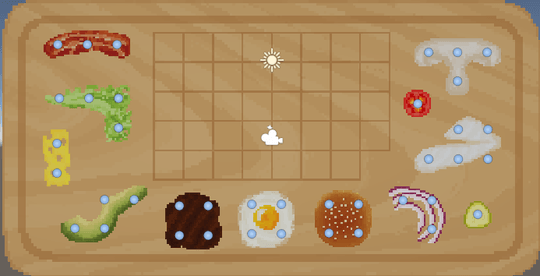
Food items with visual raycasts (Fig. 22)
Next iteration of placing food items on grid (Fig. 23)
I next tried to add a function that also checks if there is food in the way of the board, so you can't overlap the food items. At first it was not working, and just kept detecting itself as all the food was on the same layer. I tried to set it to ignore its own collider, but that did nothing. It turns out I was using the wrong component - since this minigame is 2D, I should have been using Physics2D.OverlapPoint, not Physics2D.Raycast. With this change, it works as intended, and food cannot be placed on itself (fig. 24).
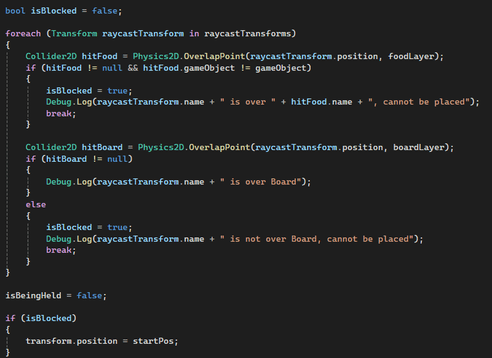
Final iteration of placing food items on grid (Fig. 24)
Week Eight
I unfortunately got the flu right as the break ended, and couldn't even look at a screen without feeling nauseous. Along with this, I was also still feeling burnt out, so I allowed myself to take a break and recover.
I did a few small tasks, such as adding in the idle animations Lily made for each character. I will make a change in these to randomise when they start because it looks vaguely unsettling with them all moving in sync.
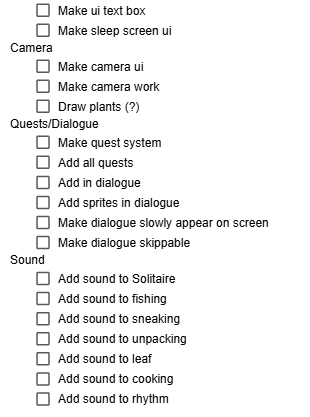
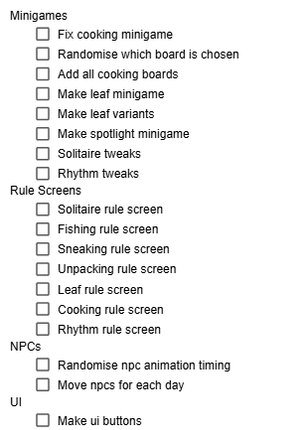
I created a better to-do list with everything I could think of (fig. 25). I tried to go in depth as I could, and will continue to add thigns to this as I think of them. One of my main faults during this project has been not making detailed enough timelines and to do lists - I find it very hard to visualise and remember everything that needs to be done, so when I can't see it like this, I just forget about it.
Updated to-do list (Fig. 25)
Week Nine
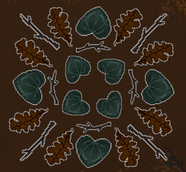
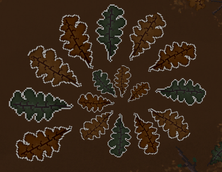
Leaf patterns (Fig. 26)
Leaf Minigame
One of the minigames we decided on was a leaf/stick organising game (fig. 27). At first we weren't sure how it would fit in with the story, but Lily made sure the narrative incorporated it, where Alex shows Ernest the cool patterns he has made in the forest and invites Ernest to make some. At first I wasn't sure if I wanted the game to kind of be open, like you could make your own leaf pattern, but since all the games so far have a win condition, I wanted to keep in line with that. Lily created some leaves and sticks, as well as white outlines for each. I arranged these into patterns in unity (fig. 26), and one of the few patterns will be chosen for the player to complete when they play this minigame.
This is a very simple minigame. I was worried that a few of our games would be too simple, but when I tried it in context with the game so far, it works very well. These minigames are not meant to be complicated. They are just meant to give the player some more interaction and freedom, to make them really consider this a game and not a visual novel.
Leaf minigame (Fig. 27)
Spotlight Minigame
Most of our minigames take place in the camp. However, the leaf minigame and this one are both forest minigames. While the player will spend a lot more time in the camp than the forest, we did still want a few minigames for the forest so it is not only dialogue. Our game is more of a cozy game, however this minigame should hopefully bring a little bit of tension to the player. The dialogue before will be Ernest wondering if he heard something in the forest, and then you will have to find Alex in the dark using only a small spotlight.
This again is a very simple game, but I believe it really adds a lot to the game. The player will have to move the spotlight around to reveal the scene and find where Alex is hiding, and click on him to win (fig. 28). Alex will also move around every few seconds to make it harder. We decided to add some other animals to add more life to the scene, so Lily drew a deer, a possum, and a ruru (morepork, native to NZ). These animals will also be moving around the scene, but nothing happens if you click on them.
Spotlight minigame (Fig. 28)
Cooking Minigame - fix
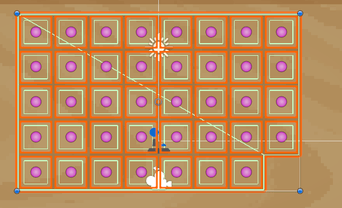
I was still having issues with the cooking minigame. Occasionally, the food items would get stuck on the board and you could not pick them up, and when this happened, you could then place other food items on top of them. I ended up changing how I approached this minigame, and instead of detecting different layers, I gave each of the grid spots a collider and a script that tracks whether it is empty or not (fig. 29). When you try to place food down, it will use each of its raycast to find the grid space underneath and will only be successfully placed if there is a grid spot (it is over the board) or if it is available (not got food already on it). This works a lot better and I find this way much cleaner and easy to understand. This did mean that for each order/level I had to manually make all the colliders around the grid spots, but it was definitely worth it.
As a back-up, I've also added in a button that removes all the food off the board, just in case they do get stuck again. This is something I think I would have added anyway, because if you place down all the food except one and then realise it won't fit, it would be annoying to then have to manually take off all the food. I also added a rotate mechanic, triggered by the space bar when holding the food. This makes the game slightly harder, but also allows for more solutions. (fig. 30)
Grid spots with colliders (Fig. 29)
Cooking minigame (Fig. 30)
Week Ten
Camera
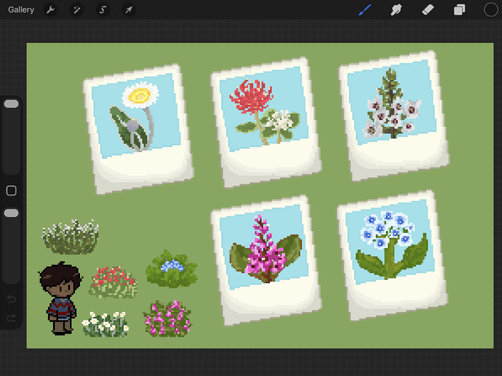
One of the mechanics we wanted to include was taking photos of plants around the camp. This ability will be unlocked during one of the quests/tasks from the teachers. We thought this would be a good way to get the player to explore the map, as well as being a perfect way to incorporate some New Zealand culture with native plants. I drew all of the flower assets in procreate, both the large and small versions (fig. 31). The small versions will be the ones displayed around the camp and in the item slots in the book, and large ones will be what pop up on screen when you take the photo and in the book when you select the item slot. The native plants I chose were:
- Marlborough rock daisy
- Dwarf pohutukawa
- Snowcap
- Wiri Charm
- Forget me not
Since I was changing the inventory system I already made in semester 1 to a camera system instead, there were only a few tweaks I needed to make. I didn't want the quantity to display since you would only be able to get one photo of each. I didn't want the item in the scene to get destroyed since the player isn't taking it. Instead, the prompt to take a photo just gets disabled. And when a photo is taken, a polaroid of the flower and its name pops up on screen for a second.
Native flower assets (Fig. 31)
I also redrew lots of the UI elements as pixel art (fig. 32).
New UI assets (Fig. 32)
Game Flow
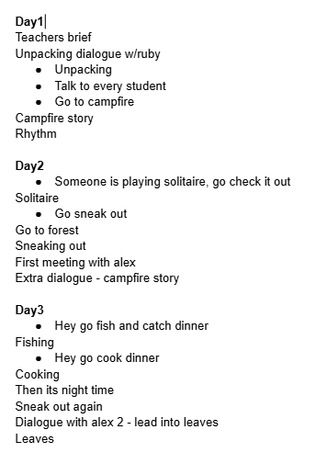
Me and Lily created this timeline (fig. 33) for our game. This is something we meant to do a while ago, but we kept being busy with other elements of the game. We decided on a five-day long game, with around 2 minigames per day. I started adding in the dialogue Lily had written. Some of the dialogue was simply triggered by talking to a student who had a yarn interactable script, while others needed to be triggered by certain events. Looking back, I probably should have created some kind of quest system that held all the variables, but instead I used a lots of bools and the day count to trigger certain events. This is definitely not an efficient system for a longer game, but since ours is only 5 days, it should be fine.
For the playtesting next week, I got most of Day One complete. It was still quite rough since I could not figure out how I wanted to structure it and how to carry the data across scenes that didn't have the same active scripts. This took me a lot longer than I thought it would, to get the game flowing. However, I'm hoping I will speed up since while doing day one I am figuring out how to make it work at the same time, and trying different methods.
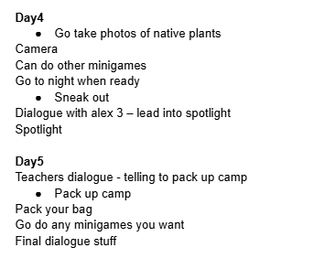
In-game timeline (Fig. 33)
Solitaire Sprites
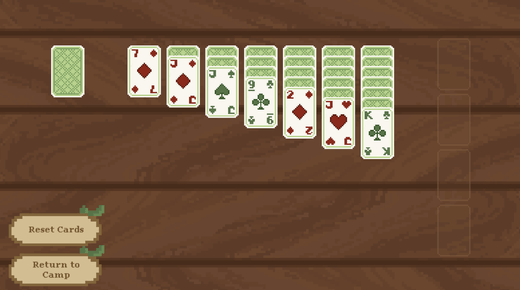
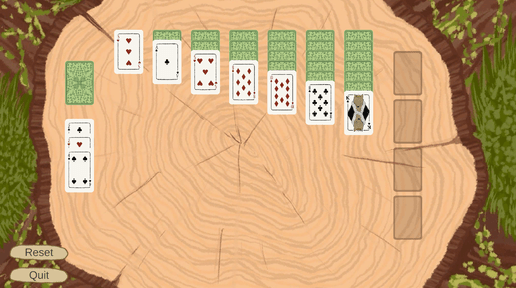
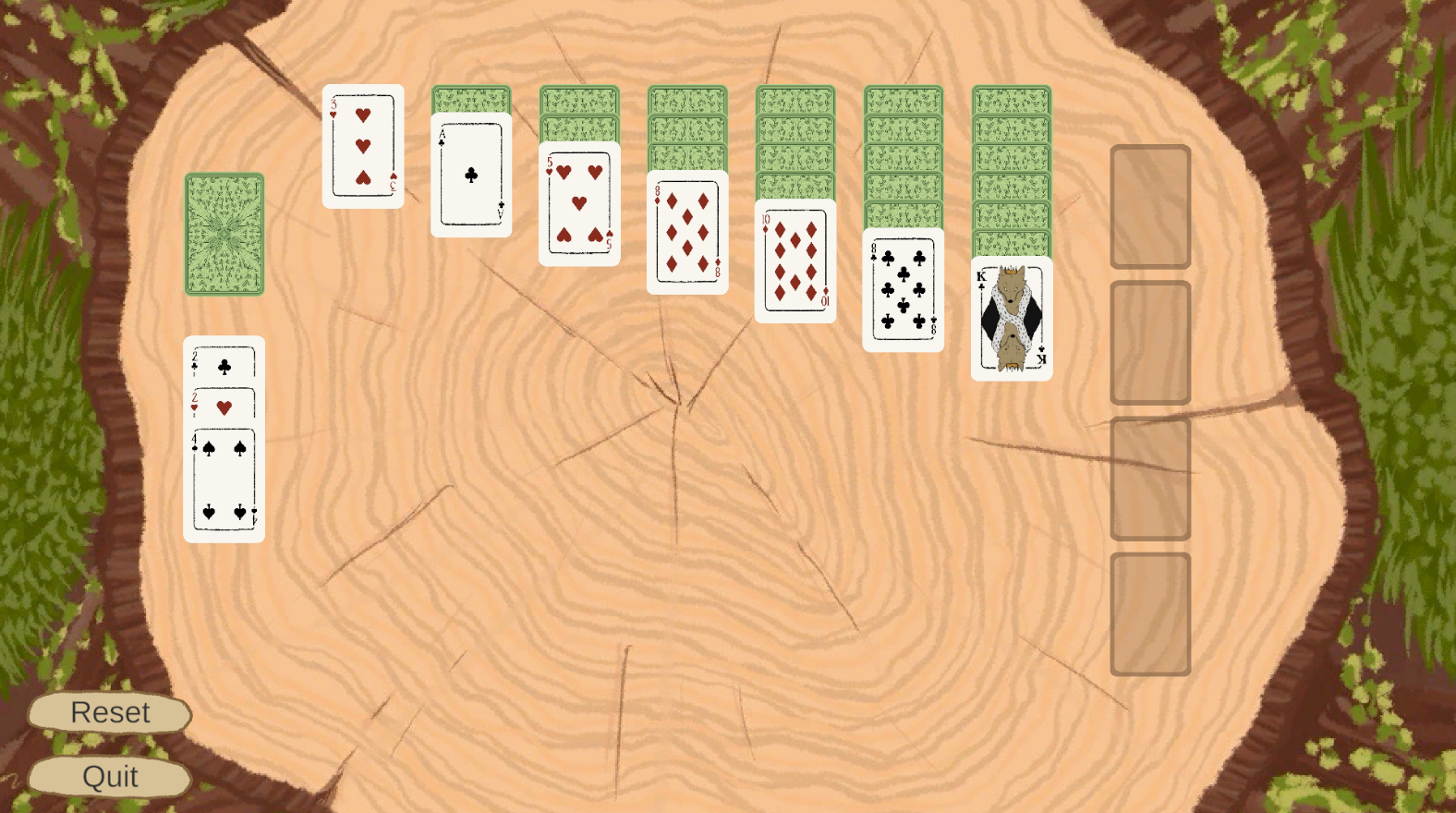
I redrew the solitaire sprites to be pixel art (fig. 35). While I loved the cards I had previously designed, there was no way I'd get that much detail on pixel art and still look good. The new ones are simpler and easier to read. I also changed the background since Lily modelled some picnic tables and we decided it would make more sense to have the solitaire at a table.
Old solitaire sprites (Fig. 34)
New solitaire sprites (Fig. 35)
Week Eleven
Final Playtesting
For the final playtest, only Day 1 was available and it was not fully finished. Most of the feedback was positive, especially about the art style and dialogue, and the rest was stuff we expected, like the tasks not being crossed out when you have completed it and needing more visual feedback when tasks or minigames have been completed.
A lot of people were struggling with the rhythm minigame. One person suggesting we change the keys from WASD or the arrow keys to DFJK, which seems odd but in practice, it is actually much easier. This change definitely helped with this minigame, so while I didn't get time to adjust the speed of the flow, this did help.
One thing I had been struggling with was data not passing across scenes properly. Only some scripts persist across all the scenes, and this is why the quests weren't being crossed off properly if you play a minigame part way through one. I ended up moving all the main functions to a Game Manager that would persist across every scene. I also created a script to pass variables between the Yarn Spinner scripts and C# scripts whenever a new scene was loaded or variable was changed to keep all the variables in sync.
Updated To Do List
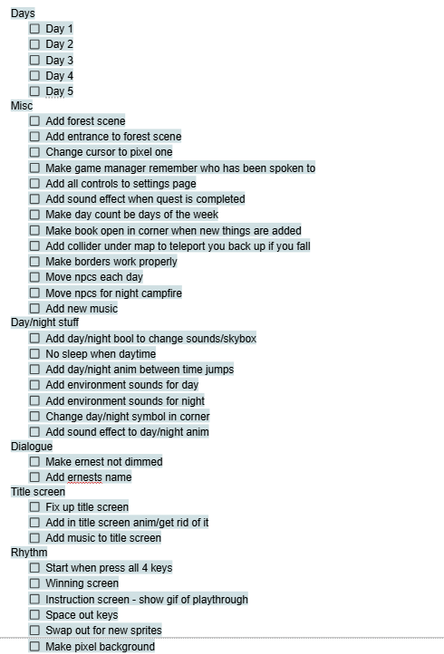
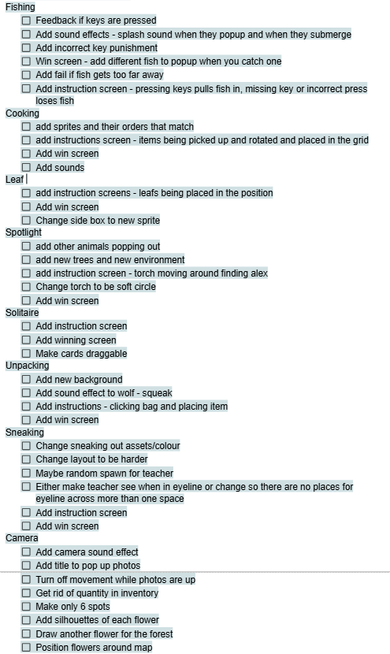
Even though I had only redone my to do list a few weeks ago, it wasn't working for me. I created this one (fig. 36) which is very detailed (it was 2.5 pages...). I separated every minigame and feature and added in everything I could think of that needed to be done. Some were smaller things, like changing a sprite to a new one or adding instruction screens, but others, like all the Days at the top, would take a lot longer. I definitely did speed up while doing the days, I got days 1, 2 and 3 fully finished this week. I also did manage to cross off a lot of the smaller things.
Updated to-do list (Fig. 36)
Setting up interactables
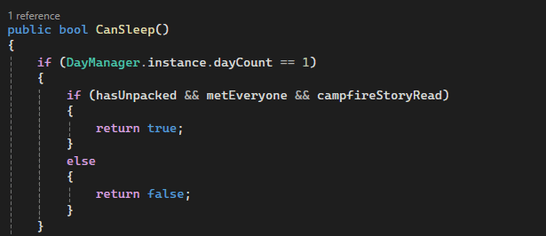
I connected a few of the interactable game objects in the camp scene, like the tent where you go to sleep, to functions like this one (fig. 37) in the Game Manager. The Game Manager keeps track of most of the conditions, so when the player interacts with the tent, it will see if CanSleep is true, else you'll get a dialogue saying it's too early to sleep. The campfire and entrance to the forest have a similar function. So far, I only have day 1 in, but I will add in the rest of the days as I get to them
CanSleep function (Fig. 37)
Instruction/win screens
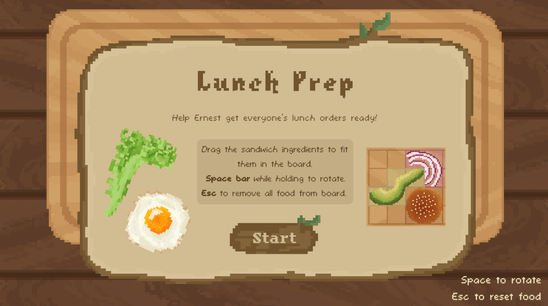
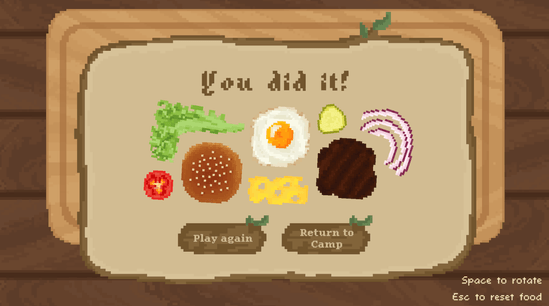
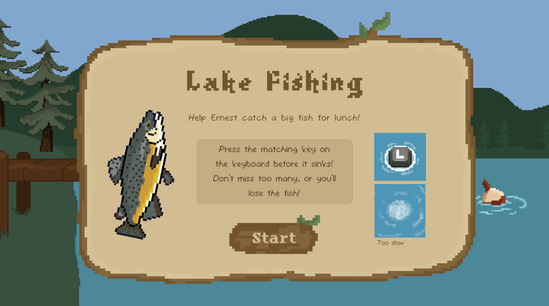
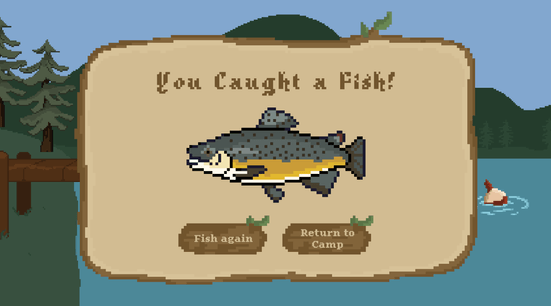
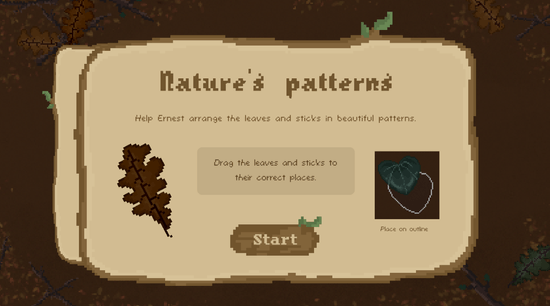
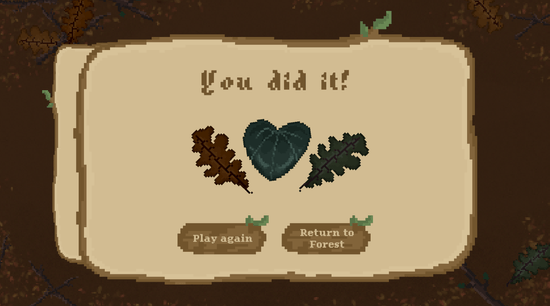
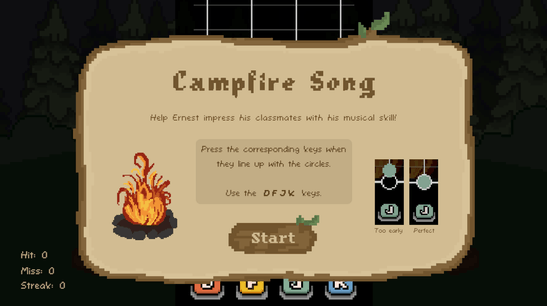
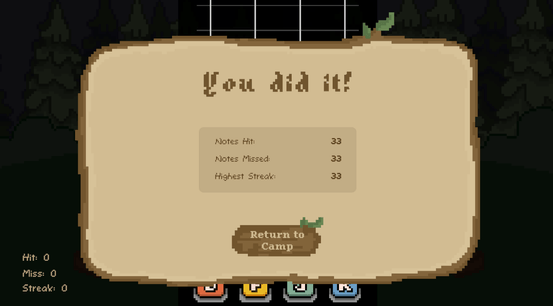
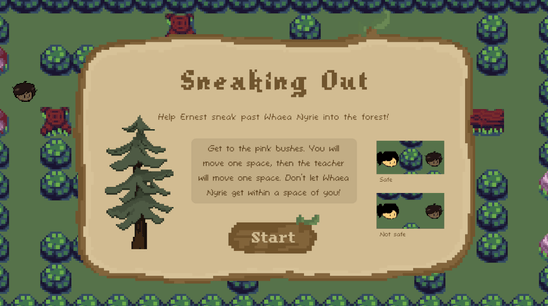
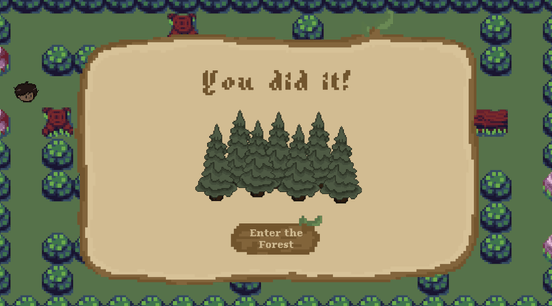
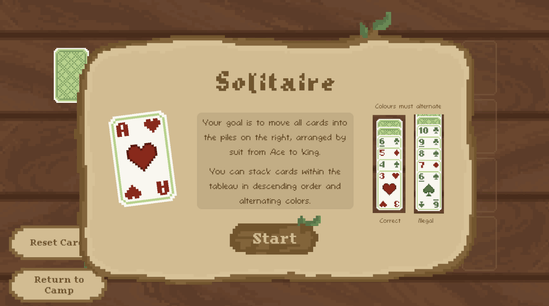
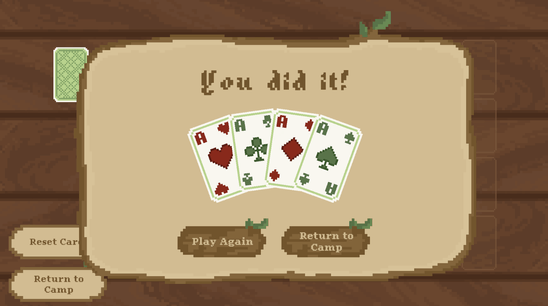
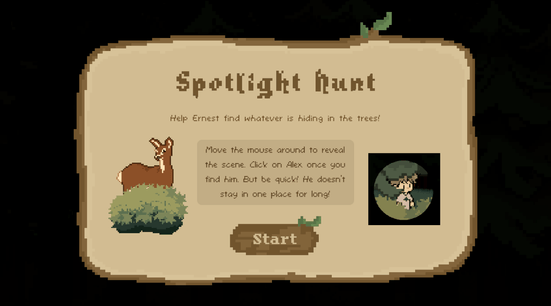
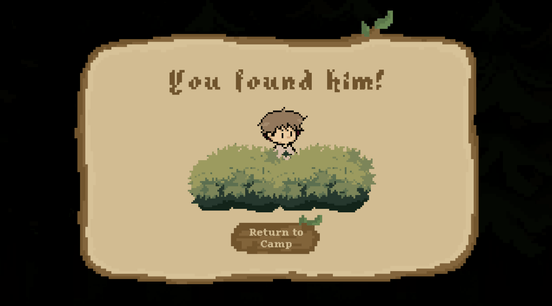
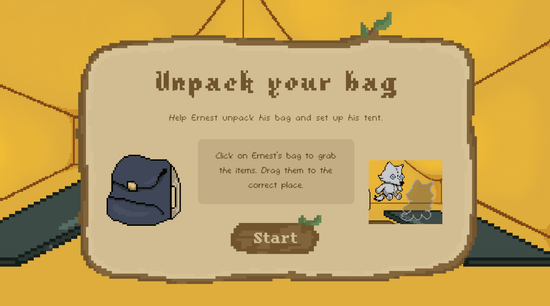
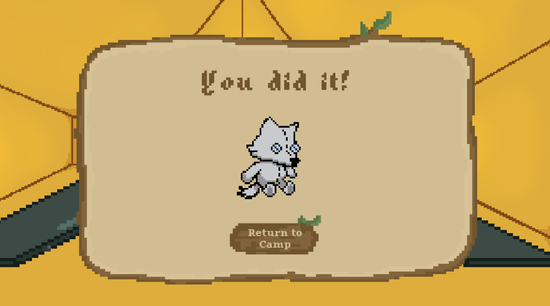
One of the main feedback we got during playtesting was that we need instruction and win screens for all the minigames (something we were planning to do anyway). I wanted them all to look similar but obviously be catered to each minigame, so I made a template for myself and copied it to each scene and edited it to fit that minigame.
Dialogue fixes
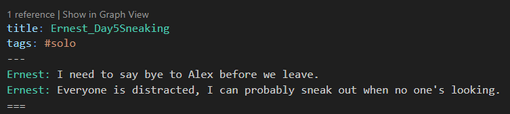
Earlier I made my own custom Line View script for Yarn Spinner to show the character portraits. Ernest's would always be active on the right side, and the left portrait would switch depending on who is talking. However, some dialogue is Ernest thinking to himself, so I wanted the left portrait to be empty. With my original script, even if Ernest was the only one in the dialogue, the previous right portrait would still be there. I created a tag that I could add to the Yarn scripts that sets the right portrait to inactive (fig. 39, 40).
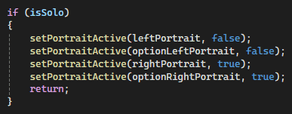
Checking for isSolo tag (Fig. 39)
Setting solo tag (Fig. 40)
Another issue I was having was that the dialogue would flash slightly in between each line. It turns out that even though I had set the fade in and fade out times to 0, the use fade effect bool was still ticked, causing it to flash. Turning this off fixed the flashing, however it presented me with a new issue. The fade must have caused the scripts to wait for a frame before turning interactions back on, beacuse with it off the player would get stuck in a loop with an NPC. Pressing E to continue the dialogue would end the dialogue but immediately restart it in the same frame. To fix this, I added an isInteractable bool to all the interactable objects, which makes all the objects unable to be interacted with during dialogue and only re-enables it one second after dialogue ends. This also helps fix another small bug of the player clicking through the dialogue too fast and accidentally restarting it.
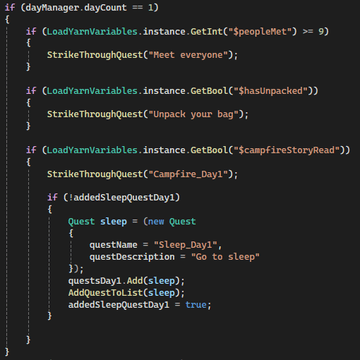
Quests List script
I made a QuestsList script to cross off the quests when they have been completed (fig. 41). Looking back, I should have used something like this as the main thing to keep track of all the quests instead of the Game Manager, but it worked for me for this small game. In Update, I had these for each day, checking if the quests had been completed, and adding new quests when necessary. It would constantly check the yarn variables to see if they had been triggered, and if they had it would cross them out. I had to add bools for adding new quests, because for example when Campfire_Day1 had been crossed off, new quest Sleep_Day1 would be added every single frame. I probably should not have done this checking in the Update function, I should have had it directly attached to the LoadYarnVariables, and it would trigger a new quest being added once it had been changed to true. This is definitely something I will keep in mind for future games.
QuestsList Update function (Fig. 41)
Week Twelve
I finished adding in all the quests and triggers to make the game run through all the way to the end at the start of this week. This was my main focus before getting to all the smaller things. I did get a lot faster as I did this.
Quest bug fixing

One thing I had been meaning to add was an indicator for the player to know when they had new quests or when they had completed a quest. We already had a small book icon up in the top left corner of the screen for the quests, but I wanted to add some sort of animation or sound to this. At first I tried a pencil line sound effect, like a strike through, but because of the quests being reloaded when the scenes were changed, the sound would replay when it wasn't neccesary, and sometimes play twice. I decided to scrap this and make the book icon continuously shake when there was something new to be looked at. I added a bool in the StrikeThroughQuest function (fig. 42) that would set newQuestsToSee to true. This bool would then remain true until the player opened the quest list. While the bool is true, a SpriteShaker script would be called to shake the book icon (fig. 43). This worked much better, it was less intrusive but still obvious enough that the player would notice.
StrikeThroughQuest function (Fig. 42)
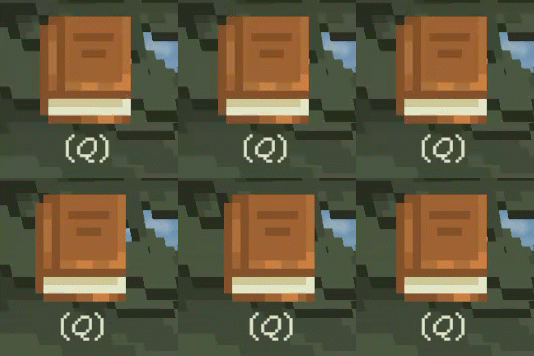
Shaking book icon (Fig. 43)
Sound effects
All of the sound effects and background music were found on FreeSound.org. I used a basic AudioManager script to hold all the sounds, and just called them when needed.
Map Borders
I had previously added box colliders around the map to ensure the player stays in the correct area. However, sometimes the player can force their way between the colliders, no matter what I tried to change. To combat this, I added a trigger collider under the whole map that teleports the player back to the start position by the campfire if they fall through/off the map. I also added a layer of trigger colliders around the border so if the player gets out, they will be again teleported back in, with some dialogue of Ernest saying he is not allowed out of bounds. I figured this was a good enough work around since the solid colliders were not working effectively. (fig. 44)
Map borders (Fig. 44)
Final Edits
I spent the last couple of days tidying everything up, making sure all the dialogue worked properly, playing throught the whole game multiple times and getting my family to test it. One of the things my family said was that they didn't know the controls. It's very intuitive to me as someone who plays PC games, but they didn't even know to use WASD or E to interact. I added in the controls to the dialogue at the start to feel more part of the game.
Reflection
I'm proud of how our game, Ernest & Alexander, has turned out. I have learnt so much while making this game. So many new coding skills and game theories. When my code didn't work, I would turn to a range of resources, like video tutorials, Unity forums, and my dad who is a programmer (though not for video games). I've developed a much better understanding of how to problem solve within my own code. I also learned the importance of taking breaks when frustrated. Often, stepping away and letting my brain process and rest allowed me to return with a fresh perspective and find solutions quickly. That shift in mindset, from panic to patience, has made me a better and more confident developer.
There are several things I would do differently if I tackled this project again. I would like to research better script management and variable organisation to keep my scripts clean and readable. For this project, I think what I did was fine, but for anything larger, the amount of variables I had across scripts was too disorganised. I'd like to try again with Yarn Spinner, especially the animated test features, or even try a different dialogue system. I think I could have utilised it a lot better if I had more time.
I’m extremely proud of how Ernest & Alexander turned out. Working with Lily was one of the highlights of this project. We worked together with honesty, creativity, and respect, constantly discussing our ideas, brainstorming solutions, and handling conflicting opinions constructively. It was a very healthy and collaborative dynamic, and I’m grateful for it. It has reminded me how valuable clear communication and shared creative vision are in a collaborative design process.
Note: all of these annotations can be found in Semester 1 and 2 in their chronological place, I have just copied them here for easy access.
Night in the Woods
Semster 1: Week 5
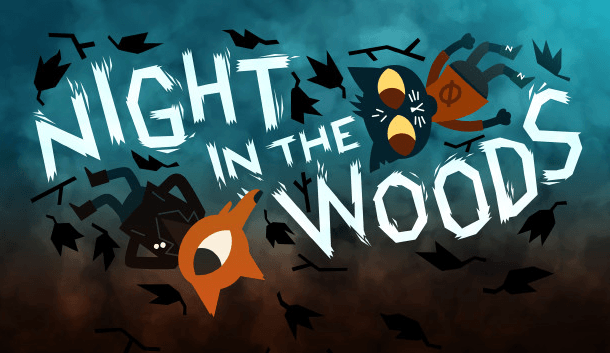
Infinite Fall & Secret Lab. (2017). Night in the Woods [PC Game]. Finji.
Night in the Woods is a narrative-driven 2D platforming game that follows Mae Borowski as she returns to her hometown, Possum Springs, after dropping out of college. She reconnects with childhood friends, re-explores the community, and investigates strange happenings in the town. Throughout the game, Night in the Woods offers several minigames to the player, including a rhythm game on Mae’s bass guitar, carrying groceries for Mae’s mother, stealing pretzels from a food stand, and awkward knife fights with friends. These minigames are integrated into the storytelling, and support the narrative by building intimacy, revealing character dynamics, and reflecting on Mae’s emotional state. I personally really love narrative based games, but I get bored easily of visual novels, so this game was the perfect balance of dialogue and interactivity.
Night in the Woods is highly relevant to my research because of the way it uses the minigames to reinforce the narrative, rather than distract from it. The minigames do not exist to simply challenge the player - though players do have the option to play as many times as they wish - but to bring them closer to the characters and support the story. Night in the Woods cleverly weaves together the gameplay and narrative, keeping players engaged even though it is heavily dialogue focused. This technique of incorporating minigames that feel interwoven into the game is something that I will be taking with me into making my own game.
Night in the Woods has been crucial in my approach to minigames within my capstone project. I have been inspired by this game since the start since there are so many elements that I can learn from, including the minigames, dialogue, story flow, and environmental storytelling. This game challenges visual novel conventions by seamlessly combining gameplay and narrative rather than keeping them separate, something that I am very keen on bringing into my game. It has encouraged me to really put thought into the minigames I add to my game, and how they can be used as key narrative devices, rather than feeling like something added to keep players engaged.
Narratology vs Ludology
Semster 1: Week 6
Ryan, M-L. (2023). Narratology for Game Studies. The Encyclopedia of Ludic Terms. https://eolt.org/articles/narratology
Narratology analyzes the structure and function of narratives across various forms of media. In the context of games, a debate emerged between narratology vs ludology. Ludologists argue that video games are a unique medium that should be discussed in their own right, not to be interpreted in the same way as books or films, whereas narratologists maintain that games should be interpreted through the traditional lens of narrative theory. Marie-Laure Ryan (2023) offers a compelling perspective: “A feature that distinguishes the narrativity of games from that of other media is that, in addition to the distinction between the scripted story and the discourse that presents it, there is an additional level of narrativity, namely the story constituted by the actions of the player.” I think this perfectly captures the distinction of games to more traditional narratives - players actively contribute to the story being told through their actions and choices. Without the player, the story cannot exist, but without a compelling narrative, the player lacks meaningful engagement.
Personally, narrative is one of the most important aspects of any game I play. I don’t find myself drawn to games that have little to no story. I love being immersed in the game world, interacting with its characters and environments. However, interactivity is equally important. It is what makes a game more than a visual novel, by keeping the players engaged and invested.
The theories of narratology and ludology are central to my research question, which explores how to meaningfully combine narrative and interaction. The minigames and narrative need to feel fully integrated, not separate elements that happen to exist in the same space. As Ryan (2023) notes, “But just as the stories of film, theater, comics or literature are adapted to their medium, so are the stories of games: they are meant to motivate playing and not to be extracted from the gaming environment.”
These theories are essential to how I will approach my capstone project. Ryan’s discussion on narratology in game design has given me insight into many aspects of it and will guide my efforts to ensure my game stays firmly rooted in narrative gameplay, avoiding both the shallowness of a purely mechanical game and the staticness of a visual novel. “It is their narrative content that allows games to have meaning.” (Ryan, 2023).
Environmental storytelling
Semster 1: Week 6
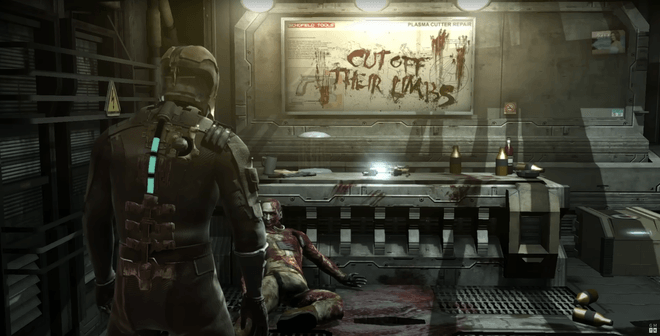
Game Maker’s Toolkit. (2020). How Level Design Can Tell A Story [YouTube Video]. In YouTube. https://www.youtube.com/watch?v=RwlnCn2EB9o
Originally proposed by Don Carson (2000), a former Disneyland park designer, environmental storytelling refers to the way physical space can convey narrative. “The story element is infused into the physical space a guest walks or rides through. In many respects, it is the physical space that does much of the work of conveying the story the designers are trying to tell. Color, lighting and even the texture of a place can fill an audience with excitement or dread.” (Carson, 2000). This concept has become crucial in game design today. Without it, game worlds can feel empty or disconnected from the story.
Since game narratives are often non-linear and players often don't allow glimpses into the thoughts and memories of characters the way we do in films or books, environmental storytelling plays a key role in communicating backstory and subtext. It allows the audience to uncover the world’s unique culture and history through exploration and deduction. Game Maker’s Toolkit (2020) explores this in How Level Design Can Tell a Story, noting that “[environmental storytelling] makes us an active participant in the storytelling process and not just a passive viewer.” This sense of active discovery is one of my favourite parts of video games. I love wandering through game environments, talking to all the NPCs, reading books and notes, examining details and props. These experiences build a rich, full world that helps immerse the player into the story.
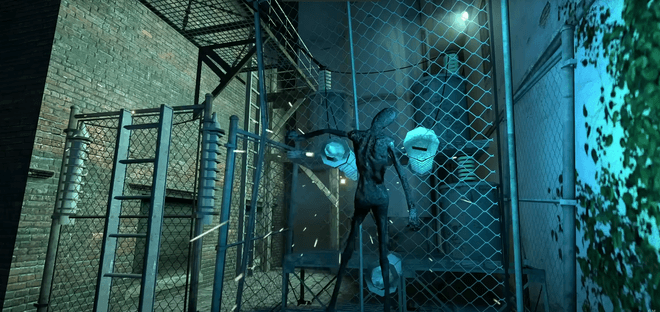
For my own game and research, environmental storytelling is a design practice I will be keeping in the forefront of my mind. Since my research question focuses on effectively combining narrative and gameplay, embedding narrative elements into the environment is a powerful way to keep the story present but unintrusive. One insight from Game Maker’s Toolkit (2020) that stuck with me was how environmental storytelling can be used for gameplay purposes as well. For example: “A saw blade stuck in a sliced up zombie suggests using the says with your gravity gun to defeat enemies (Half-life 2, 2004), an enemy fried on a fence warns us about the dangers of touching it, maps and signage could help us navigate complex spaces, and props can suggest puzzle hints in a non-intrusive way.” This is definitely something that I will keep in mind while designing my game. There are several gameplay mechanics and controls that need to be introduced, and I was to avoid having them pop-up in a way that can ruin the immersiveness of the game. Instead, I could incorporate diegetic hints, like notes laying around or guidance from NPCs to teach the player in a way that feels natural in the game world. Environmental storytelling not only deepens narrative immersion, but also supports intuitive gameplay design.
Bartle’s Taxonomy
Semster 1: Week 8
Bartle, R. (1996). Hearts, Clubs, Diamonds, Spades: Players Who Suit MUDs. https://mud.co.uk/richard/hcds.htm
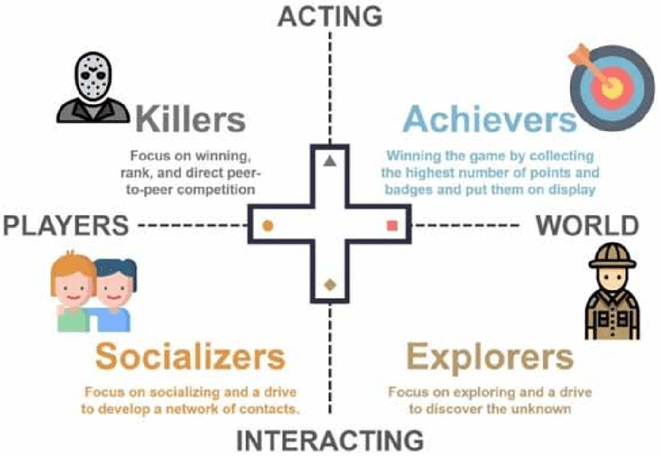
Bartle’s Taxonomy (1996) remains a highly relevant framework for understanding player motivations, even 30 years later. Developed in the context of Multi-User Dungeons (MUDs), Bartle identified four main player types: Achievers, Explorers, Socialisers, and Killers. “These approaches may arise from the inter-relationship of two dimensions of playing style: action versus interaction, and world-oriented versus player-oriented.”
- Achievers act on the world - they like to complete goals, accumulate levels etc.
- Explorers interact with the world - they like to uncover secrets, explore the entire map, talk to every NPC etc.
- Socialisers interact with other players - they like to form relationships, chat with other players etc.
- Killers act on other players - they like to dominate and disrupt, are drawn to competition etc.
Understanding which player types you want to gear your game towards is crucial in shaping the structure and mechanics. “To appeal to achievers, for example, one approach might be to introduce an extensive level/class system (so as to provide plenty of opportunity to reward investment of time) and to maximise the size of the world (so there is more for them to achieve).” (Bartle, 1996).
In my capstone, while it would be ideal to try to cater for all gamer types, that is not possible with our concept. The game is single-player, with no in-game multiplayer features or external community, so naturally Socialisers and Killers are excluded. Instead, we will focus on appealing to Achievers and Explorers, which aligns well with my own player preferences. To ensure I support both types, I will implement elements like a plants checklist in the player’s journal to track progress and discovery and minigames which include high-score tracking to offer replayability and personal success for Achievers. For Explorers, the game world will be detailed and fairly expansive, full of secrets and hidden areas and engaging NPC interactions.
I have always appreciated Bartle’s Taxonomy for the practical, intuitive way of analyzing how players will engage with games in different ways. For my research about seamlessly entwining narrative and minigames, understanding the target player for my game helps me to work out the balance between them in terms of challenge, exploration, and reward.
Experience-based Play
Semster 1: Week 10
Macklin, Colleen, and John Sharp. Games, Design and Play : A Detailed Approach to Iterative Game Design, Pearson Education, Limited, 2016. ProQuest Ebook Central, http://ebookcentral.proquest.com/lib/aut/detail.action?docID=7052184.
According to Colleen Macklin and John Sharp (2016), there are several main types of play that games can engage with: competitive, cooperative, skill-based, experience-based, whimsical, role-playing, performative, expressive, and simulation-based. Most games don’t fall neatly into one of these boxes, many games actually combine multiple forms of play to create a more dynamic and engaging experience for the player. This framework helps expand how we categorise games beyond the traditional genres, focusing more on how players emotionally experience them.
Of these types of play, the one I am most interested in exploring is experience-based play. Macklin and Sharp define it as “a kind of play focused on providing players with an experience of the game through exploration, unfolding a story, or communal engagement.” Experience-based play encourages players to engage with the environment on their own terms and pace. It allows them to explore, find details, and discover the story gradually rather than it being spoon-fed to them. I’ve always loved games that allow me to discover things organically. I enjoy wandering through beautiful, carefully thought-out environments and piecing together the narratives from character interactions and environmental storytelling. I find this kind of play to be far more immersive and rewarding than traditional linear storytelling because it gives the player more freedom and room for curiosity.
Experience-based play is closely tied to my research question, which is about meaningfully combining narrative and interaction. Allowing players the agency to discover the story themselves, through explorations, conversations with NPCs, and environmental details, fosters a stronger connection to the narrative. The game becomes something they actively participate in, rather than passively watch.
While experience-based play will be my main focus while designing my game, I’ll also look at other forms of play, such as whimsical play due to the fantastical elements of the narrative, and skill-based play for the minigames that will require player input and challenge. Blending these types of play will enable me to design a cohesive, engaging experience that invites the players to immerse themselves in both the mechanics and narrative of the game.
Choices Matter
Semster 1: Week 11
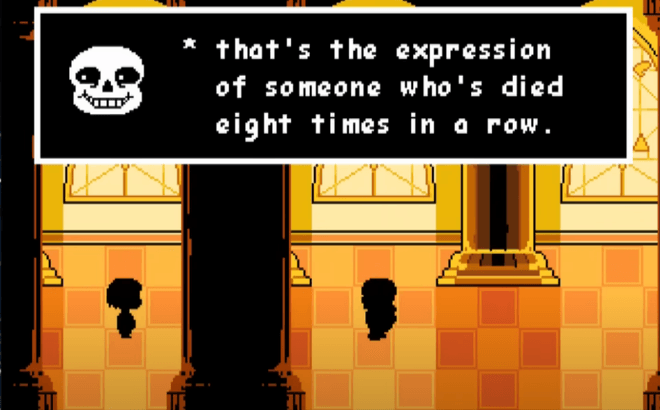
Toby Fox. (2015). Undertale [PC Game]. Toby Fox.
Undertale is a 2015 RPG created by Toby Fox, and it remains one of the most impactful games I’ve ever played. The narrative, characters, music, and art style all come together to produce an unforgettable experience, but what stands out to me the most is the effectiveness of the choices. While many RPGs include multiple endings, Undertale goes beyond that, utilising a morality system to respond to the player’s decisions in a way that feels personal and impactful. The game features three main endings that are determined by how you interact with the characters: Pacifist where you don’t kill anything, Genocide where you kill everything, and Neutral. Undertale plays on the previous experiences with RPGs and uses a system of EXP and LV, causing most players to assume you gain experience points and levels for defeating monsters. However, near the end of the game, Sans (one of the main characters) reveals that EXP and LV are Execution Points and Level of Violence. As the tagline says “UNDERTALE! The RPG game where you don't have to destroy anyone.”
The impacts to your choices are extreme but realistic. Choosing the Pacifist route results in a hopeful ending where the characters escape to the outside world together. In contrast, the Genocide route leads to a much darker conclusion. Flowey, one of the main antagonists, actually assists you, however there will be constant reminders from the game that this isn’t necessary. You are probably doing this because you want to get every ending. Characters plead with you to stop. Sans sums it up near the end of the game: “No matter what, you’ll just keep going. Not out of desire for good or evil… but just because you think you can.”
One thing that really amazed me was how the game remembers. On my first playthrough, I killed Toriel after trying to spare her and assuming it was futile, but was left feeling awful. After, I discovered it was possible to spare her so I went back to a previous save and didn’t kill her. But then Flowey called me out - “Don’t act so cocky. I know what you did. You murdered her. And then you went back, because you regretted it.” - and I was shocked. There were consequences, even after I “undid” my actions.
This concept, that choices have weight in the narrative - is something that I want to utilise in my capstone project, though in a more subtle way. Players will face decisions like whether to keep a friend’s secret or to react in fear or acceptance to certain situations. While these choices won’t lead to wildly different outcomes, they will still shape the story and your relationship with the characters. This kind of reactive narrative deepens the immersion and holds the player more accountable in the world they are engaging in.
MDA Framework
Semster 2: Week 5
Hunicke, Robin & Leblanc, Marc & Zubek, Robert. (2004). MDA: A Formal Approach to Game Design and Game Research. AAAI Workshop - Technical Report. 1.
Originally proposed by LeBlanc, Hunicke, and Zubek (2004), the MDA framework (Mechanics, Dynamics, Aesthetics) is a model for analysing and designing games. It separates games into three building blocks: Mechanics, the basic rules and systems such as player controls, enemy detection, algorithms; Dynamics, the behaviour that results when the mechanics are enacted during play; and Aesthetics, the emotional responses elicited from players from the dynamics. Players primarily engage with the game starting from its aesthetics, like looking for games that fit a specific genre, designers typically start with the mechanics to produce the intended experience.
This framework has changed the way I look at designing minigames. For our capstone, I am creating the minigames to work with Lily's narrative. If the resulting player experience, the Aesthetic, doesn't match the narrative, the minigames feel disconnected and break the immersion. Using the MDA framework, I can trace back to the mechanics and edit them to create the response I intended. For example, in my rhythm minigame, there is a scoring system that creates a competitive feel since that is how rhythm games are usually scored. However this does not fit with the vibe of the overall game, it is meant to be a nice minigame to play at the campfire before bed, not stress the player to get the highest score. I can see the Aesthetics are not what I intended, so I will go back to the Mechanics to change the scoring system, which will change the Aesthetics from competetive to calm.
I will find the MDA framework a practical tool that will help me design the minigames more efficiently in a way that blends seamlessly with the Aesthetic of the narrative. By first considering the emotional response I want to evoke, the Aesthetic, I can then identify the required dynamics and mechanics. This approach supports iteration and helps ensure my design choices stay consistent with the intended player experience.
Self Reflection
Semster 2: Week 6
From weeks 1 to 6, I have developed almost four minigames: sneaking out, unpacking, rhythm, and fishing. Although I am slightly behind my timeline due to a few reasons, I think I will be able to catch up over the mid-semester break. One challenge that set me back was the quest system which proved more complex than I thought. I followed a tutorial, but since I was using a different system than the video I struggled to implement the same features. I plan to scrap my original attempt and readjust my timeline accordingly. Despite this, I feel confident I will complete everything I have set out to do.
My design process has been influenced both by my research into experience-based play and, more recently, the MDA framework. These perspectives and my continued self improvement have helped me to better understand the code, mechanics, and player experience. Earlier in this semester and last, I often relied on tutorials but struggled when I needed to adapt them. Now I am much more confident in creating minigames independently, in seeing how the different elements combine to produce the intented outcome. Moving forward, I aim to reduce my reliance on full tutorials and will instead research specific problems as they arise while constructing the systems myself.
Looking ahead, it is crucial that I keep my research question in focus: How can I create a game that integrates minigames to enforce and support narrative to design an experience that subverts visual novel expectations? To answer this, I need to ensure that each minigame feels cohesive with the overall narrative. The methods and frameworks I have been engaging with will guide me in making design choices that maintain player immersion while also allowing for iteration and refinement as needed.